
Workflows
Build autonomous agent workflows with the "Agent: Run task" action, before or after the save, chain tasks by update conditions, keep agents' fields out of clients' hands, and follow each run in Action Logs.
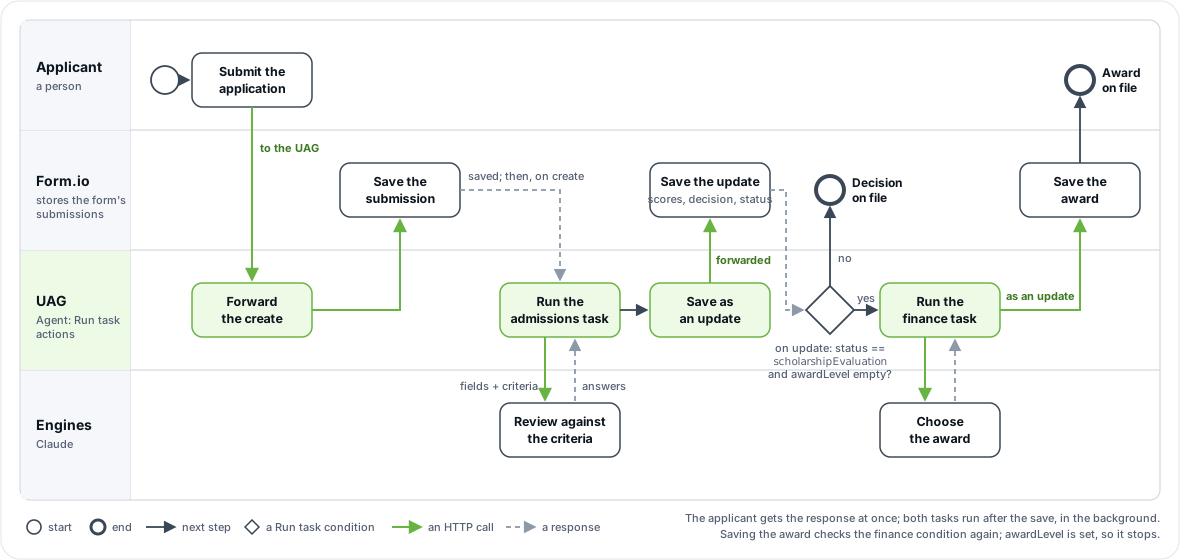
An agentic workflow runs a form's tasks with no person in the loop. The application sends its submissions to the UAG, which forwards each one to Form.io. An Agent: Run task action on the form runs one of the form's tasks on the submission, before the save or after it, and the UAG saves the task's answers. A task's save is an update, and an update can start the next task. The instructions live in the form, so changing what an agent does is a form edit, not a deployment.
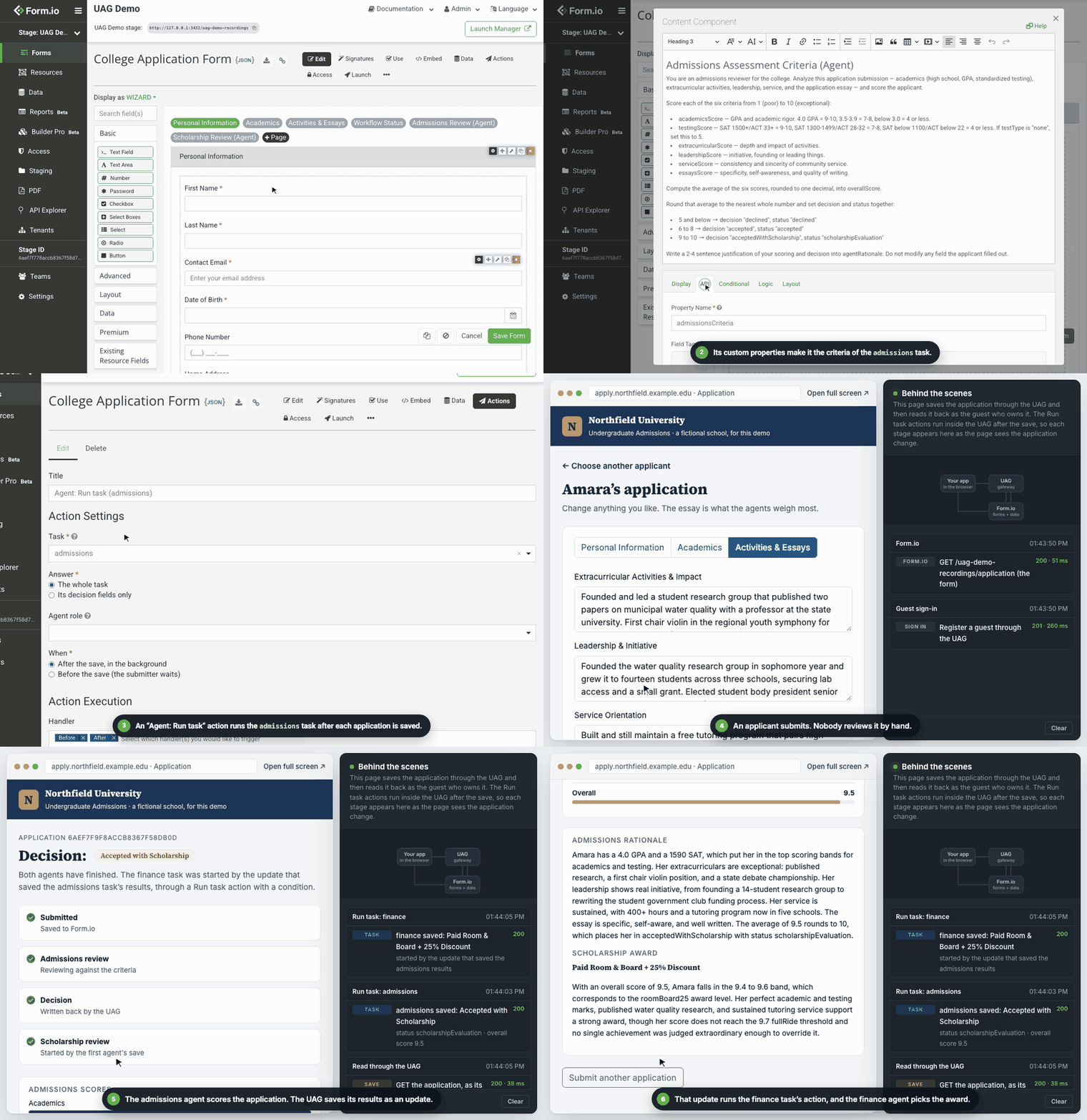
This page builds the college application workflow from the demo site's project: an admissions task scores each application and decides, and a finance task assigns a scholarship award to the applicants admissions puts on the scholarship track.
Build this workflow in your own project with the admissions workflow prompt and the Agentic Coding Plugin. Its formio-uag skill adds the "Agent: Run task" actions in a project template, a UAG module or a portal stage connected to the UAG.
What you need
| Requirement | Why |
|---|---|
| A form with at least one task | The criteria, and the fields the task fills. |
| An engine enabled on the UAG | UAG_ENGINES, for example claude with CLAUDE_API_KEY. See Engines. |
A LICENSE_KEY that includes the UAG, or, to try it, a 30-day free trial project on portal.form.io |
Run task is Agentic Formflow. It runs on Form.io Open Source and Enterprise alike with a license. Without one, a run before the save refuses the submission with 403 (code: "license_required"), and a run after the save fails and is logged. |
| Submissions sent to the UAG | Run task runs only for submissions the UAG receives: through its submission API or its MCP tools. Point the application's project URL at the UAG: the UAG's root for an Open Source server, /<project name> on the UAG for an Enterprise or trial project. A submission sent straight to Form.io runs no task. |
Nothing has to be public. Applications reach the UAG over your network, the UAG reaches Form.io, and the UAG calls the model providers outward.
How a submission flows
The UAG runs in proxy mode: it does not store submissions. For each create or update it receives, it runs, in order:
- Authentication: a Form.io user token (
x-jwt-token), which works against the UAG as it does against Form.io and is forwarded unchanged; a portal team member's remote token (x-remote-token), from a portal stage connected to the UAG; or the project's API key (x-token) or admin key (x-admin-key) from a server. - The form's Run task actions set to run before the save.
- The forward to Form.io. This is a fixed step, not an action. Form.io validates and stores the submission, and runs its own actions: Save Submission, Login, Role, Webhook, Email and the rest. The UAG never runs those itself, so nothing runs twice.
- The form's Run task actions set to run after the save. They start in the background.
- The response, which is Form.io's.
When Form.io refuses the forwarded request, the caller receives Form.io's error and no "after" action runs.
Step 1: define the task on the form
Tag the form uag, add a criteria content component, and flag the fields the task fills. In the sample, the whole review panel belongs to admissions, and three workflow fields elsewhere on the form are flagged individually:
[
  { "type": "content", "key": "admissionsCriteria", "input": false,
    "html": "<p>You are an admissions reviewer for the college. Analyze this application...</p>",
    "properties": { "uag": "admissions", "uagField": "criteria", "uagEngine": "agent" } },

  { "type": "panel", "key": "agentAdmissionsReview", "title": "Admissions Review (Agent)",
    "properties": { "uag": "admissions" },
    "components": [
      { "type": "number", "key": "academicsScore", "label": "Academics (1-10)", "properties": { "uagAuthoritative": "true" } }
    ] },

  { "type": "select", "key": "status",
    "data": { "values": [{ "label": "Accepted", "value": "accepted" }, { "label": "Declined", "value": "declined" }, { "label": "Scholarship Evaluation", "value": "scholarshipEvaluation" }] },
    "properties": { "uag": "admissions", "uagAgentDecides": "true", "uagAuthoritative": "true" } },
  { "type": "select", "key": "decision",
    "data": { "values": [{ "label": "Accepted", "value": "accepted" }, { "label": "Declined", "value": "declined" }, { "label": "Accepted with Scholarship", "value": "acceptedWithScholarship" }] },
    "properties": { "uag": "admissions", "uagAgentDecides": "true", "uagAuthoritative": "true" } }
]
The sample's panel holds the other scores and the rationale too, each with its own uagAuthoritative: only uag applies to what is inside a container, so the other uag* properties go on each field. uagEngine: "agent" on the criteria sends the whole task, decision fields included, to agent engines; remove it to let a decision engine decide status and decision.
The criteria is the agent's whole briefing: who it acts as, what each field means, how to judge each answer, the allowed values, and the exact option values for closed-set fields. A vague criteria is the most common reason an agent writes values the form rejects. The sample's admissions criteria tells the agent to set status to scholarshipEvaluation for the strongest applicants, and the finance task is keyed on that value.
A file component can be the task's input too, such as an uploaded transcript: the run reads the document and gives the engines its text (see Documents as input).
Closed-set fields with only an agent engine
status and decision are selects, so the UAG treats them as decision fields. On a save it writes a decision field only when a calibrated decision engine is confident. The sample runs Claude alone, which has no calibrated confidence, so those fields carry uagAgentDecides: "true": reconciliation then writes the agent's answer too.
| Engines enabled | Closed-set fields | Set on the fields |
|---|---|---|
A decision engine (such as jev) and an agent engine |
Decided with a confidence; written when confident | Nothing; tune uagThreshold. A task-level uagEngine: "agent", as in the sample, bypasses the decision engine. |
| An agent engine only | Answered as suggested; not written by default |
uagAgentDecides: "true" |
A run of the whole task re-decides every decision field, filled or not, so with uagAgentDecides each run asks the agent again and may replace the stored value. Use it only on fields the workflow owns, and mark them uagAuthoritative (below).
The fields the agents own
Every agent field in the sample is marked uagAuthoritative: "true". On every create and update sent to the UAG, the values a client sends for those fields, and for their uagConfidenceField companions, are removed before anything runs: on a create the fields start empty, and on an update they keep their stored values. This applies for every Run task action on the form, whatever its method, conditions or timing, so an applicant cannot submit decision: "accepted", not even through a method no task runs on. The UAG's own saves of a task's results are not affected.
Fields without uagAuthoritative stay editable: a person's correction to a suggested value is kept. See uagAuthoritative.
This protects the fields on requests sent to the UAG. To keep users off them on Form.io too, give the agent a role of its own; see Who a run acts as.
Step 2: add "Agent: Run task"
Add an Agent: Run task action to the form. The sample's template installs it as:
"application:admissions": {
  "title": "Agent: Run task (admissions)",
  "name": "agentRunTask",
  "form": "application",
  "priority": 20,
  "handler": ["before", "after"],
  "method": ["create"],
  "settings": { "task": "admissions", "answer": "task", "when": "after" }
}| Setting | Values | Meaning |
|---|---|---|
Task (settings.task) |
One of the form's tasks | The task to run. The settings form offers only the tasks the form defines, and the action cannot be saved without one. |
Answer (settings.answer) |
task (default), decisions |
The whole task: re-decides every decision field, filled and hidden ones too, and fills its empty, visible value fields, researching with uagTools when the task lists any. Its decision fields only: re-decides the decision fields alone. |
When (settings.when) |
after (default), before |
After the save, in the background, or Before the save, while the submitter waits. See Before or after the save. |
Agent role (settings.agentRole) |
A project role, not an admin role | Optional. Act at Form.io with this role, on the user's behalf. See Who a run acts as. |
Submitter roles (settings.submitterRoles) |
Project roles | Shown with an agent role. Who may submit through the agent when the form does not let their roles create submissions. |
method |
create, update |
Form.io's standard methods. Default create. |
condition |
Form.io's conditions | Form.io's standard action conditions, including its condition lists joined by all or any, and custom JavaScript or JSONLogic. |
The handler is fixed: keep handler as ["before", "after"] in a template, and choose the timing with When.
To add it in the Form.io Enterprise portal, use a stage connected to the UAG; see Connecting the Enterprise portal. In that stage the portal reads Run task's settings form from the UAG, and every other action's from Form.io. On an Open Source server, post it to the form's actions; see Attaching an action to a form. A new action, or a criteria edit, takes effect after the UAG's next PROJECT_TTL refresh or a restart.
Try it live: Run an agent task after a submission.
Before or after the save
| Before the save | After the save | |
|---|---|---|
| The submitter | Waits for the engines | Gets Form.io's response at once |
| The task reads | The submitted data, with the owned fields as stored (empty on a create) | The submission as Form.io stored it |
| Its results | Merged into the data and forwarded as the one save | Saved as an update through the UAG, which runs the form's update actions |
| The response | Form.io's response to that save, carrying the answers | Form.io's response to the create or update; the answers arrive later |
| Use it for | Triage a submission must carry when it is stored, such as routing fields | Slower work: reviews, scoring, research, and chains of tasks |
Failures
| When | What no engine could answer | Result |
|---|---|---|
| Before the save, decisions only | Some decision fields: every engine that could answer failed, timed out or was over its rate limit, or none is enabled | The submission is refused with 503 (429 when every engine was over its rate limit) and nothing is stored, so an outage never clears an authoritative field as if it had been judged. |
| Before the save, the whole task | Some field groups | The save is forwarded without those answers. |
| After the save | Anything | The submitter's response was already sent and is unaffected. For the whole task, the answers that were obtained are saved; for decision fields only, nothing is. The failure is logged ([formio-uag] Run task "<task>" failed for submission <id> of "<form>": ...) and, with the database, recorded. |
Other errors from a run before the save are answered with their status in Form.io's shape, { name, message, code } (with edition when the license is missing), so formio.js shows them as it shows Form.io's. code is stable: license_required, decision_unavailable, rate_limited, forbidden, invalid_request, configuration_error, agent_identity.
What a run after the save does
- Loads the stored submission, as the identity the run acts as.
- Runs the task. Decision fields are re-decided; value fields are generated only while they are empty and visible, so a generated value never replaces one already there.
- If nothing changed, saves nothing, so no update actions run. A changed confidence alone does not count as a change.
- Otherwise saves only the task's fields, and their provenance in
metadata.uag, as an update through the UAG. Every field outside the task stays as Form.io stored it. - If a person saved the submission while the task ran, the save is refused as a conflict, and the run starts again once on the new version. If the submission changes again, the run fails (
409) and saves nothing.
Each UAG instance runs up to four runs at a time; the rest wait their turn.
Values the form refuses
Every run validates its answers with the form's own rules before anything is saved. A value the run wrote that the form refuses (too long, not matching the pattern or input mask, out of range, failing custom validation) is left out, as if no engine had answered: the field is reported missing with the reason failed validation: <the form's message>, an authoritative field is cleared for a person, and any other field keeps the value it had. The rest of the run's answers are saved. So an engine's mistake never refuses a person's submission before the save, and never costs a run after the save its other answers. Errors in values the run did not write are left for Form.io to report. A run after the save logs what it left out ([formio-uag] Run task "<task>" left out answers the form refused for submission <id> of "<form>": <path> (<message>)), and, with the database, its record and the Action Logs name those fields.
One case is not covered: a uagAuthoritative decision field that is also required. When a run before the save is not confident, it clears the field for a person, and Form.io's required rule then refuses the submission. Do not make such a field required.
Engines are told each field's validation in its rule (Context), so this should be rare; when a field is often left out for failing validation, state the constraint in the field's description or the criteria as well.
Chaining tasks
A second task is started by the first task's save, not by the applicant: that save is an update through the UAG, so it runs the form's update actions, including other Run task actions. A chained action must run After the save: Run task actions set to run before the save skip the UAG's own saves, so they are never started by another task.
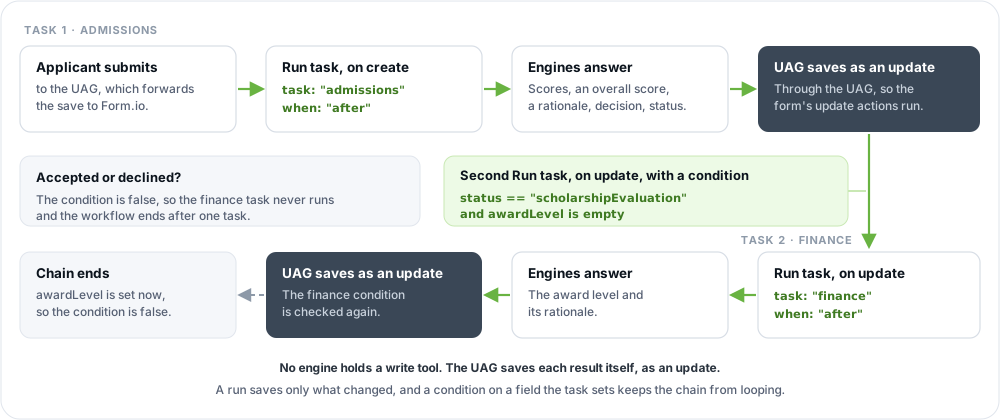
The sample's finance action runs after the save, on update, with a condition on fields the admissions task sets:
"application:finance": {
  "title": "Agent: Run task (finance)",
  "name": "agentRunTask",
  "form": "application",
  "priority": 20,
  "handler": ["before", "after"],
  "method": ["update"],
  "condition": {
    "conjunction": "all",
    "conditions": [
      { "component": "status", "operator": "isEqual", "value": "scholarshipEvaluation" },
      { "component": "awardLevel", "operator": "isEmpty" }
    ],
    "custom": ""
  },
  "settings": { "task": "finance", "answer": "task", "when": "after" }
}
An applicant submits. Form.io stores the application and the applicant gets its response. The admissions task runs and its results are saved as an update. Only when admissions put the applicant on the scholarship track (status is scholarshipEvaluation) does that update meet the finance condition, and the finance task's results are saved as a second update. Applicants who were accepted or declined never start it.
Each task fills only its own fields. status belongs to admissions, so the finance task cannot change it, and the finance criteria cannot hand the workflow back to an earlier stage by accident.
A chained run acts for the same user as the run that started it, and carries the same X-Request-Id. A chained action with no agent role of its own acts as that user, never with the agent role of the run before it: with the user's own token when they submitted without an agent role, or with a token the UAG signs for the user, with the roles they had when they submitted, after a run that acted with an agent role.
Avoiding loops
The finance task's save is an update too, so it runs the update actions again. Three things stop the chain:
- The condition tests the task's own output.
awardLevelmust be empty, and the finance task fills it, so after its save the condition no longer holds. - A run that changes nothing saves nothing. Value fields are generated only while empty, so a task run on its own output writes nothing and starts nothing.
- Confidence changes are not saves. A model's confidence varies slightly between calls; a changed
uagConfidenceFieldalone never causes a save.
As a last guard, the UAG stops a chain after 5 runs in a row that were each started by the save of the run before, and logs [formio-uag] Run task "<task>" was not run ... instead of starting a sixth.
Rely on the first, not only the second. Without a condition, every update still runs the task and calls the engines, and a whole task re-decides its decision fields on every run: with uagAgentDecides, an agent that answers differently each time saves, and so starts itself, again. An action whose condition names an operator Form.io does not know (a typo, or a format from elsewhere) is never run: the UAG logs [formio] The "<action>" action of the form "<form>" is skipped: its conditions use an operator Form.io does not know (...) once, with the operators it accepts.
An agent that "runs continuously and burns credits" is almost always a Run task action on update whose condition stays true.
Re-deciding on the server
Workflows that start from a person's own submission have a second concern: values the browser sent. If an Agentic Formflow page decided a triage field in the browser, the user could change it before submitting. When that field drives sensitive routing, decide it again on the server, before the save.
The sample's First Notice of Loss form does this with Run task set to its decision fields only, before the save:
"claim:triage": {
  "title": "Agent: Run task (triage)",
  "name": "agentRunTask",
  "form": "claim",
  "priority": 20,
  "handler": ["before", "after"],
  "method": ["create", "update"],
  "settings": { "task": "triage", "answer": "decisions", "when": "before" }
}
The task's decision fields, including fields on hidden pages, are re-decided with the caller's identity, then reconciled with the submitted data: confident answers are written, uagAuthoritative fields the server cannot confirm are cleared for a person to decide, and other values are kept. Form.io stores the result as the one save. When some decision fields cannot be decided at all, the save is refused rather than clearing fields as if the server had judged them:
| Status | Cause |
|---|---|
503 |
Every engine that could answer failed, timed out, or none is enabled. |
429 |
Every engine was over its rate limit. |
403 |
Agentic Formflow is not licensed (code: "license_required"). |
400 |
The task cannot be planned (an unknown task, for example). |
The body is { name, message, code }, with edition in the license case.
This runs only for submissions sent to the UAG. To make sure every submission is, give the form's users no create or update permission on Form.io itself, and let an agent role create submissions for them; see Project setup for agents.
Who a run acts as
A run reads, saves and creates submissions at Form.io with one of two identities, set by the action's Agent role:
| No agent role | With an agent role | |
|---|---|---|
| Acts at Form.io as | The caller, with the credential the submission arrived with | The agent role, on the caller's behalf, with a token the UAG signs |
| The caller must be allowed to | Create the submission, and read and update it for a run after the save | Create the submission, or else hold one of the action's submitter roles |
| A run after the save | Keeps the caller's credential in memory only, and fails if Form.io no longer accepts it (after a logout, for example) | Survives a restart, with the UAG's database |
| Available on | Every edition | Self-hosted Form.io Enterprise, with JWT_SECRET the same as Form.io's |
Either way, a run never uses the UAG's own project API key, and the task's engines research with the identity of the user who submitted, never the agent role. Project setup for agents walks through the roles, permissions and secret an agent role needs.
On Form.io's hosted service, which does not share its secret, actions name no agent role. Save each application from the browser as the signed-in user, so its runs act as that user: let the user create and update their own applications, and make the task's fields uagAuthoritative, so only the run may set them.
Letting the task research
A task that needs to look something up (a previous submission, a record in another form) can list read-only MCP tools on its criteria:
"properties": { "uag": "admissions", "uagField": "criteria", "uagTools": "find_submissions" }When Run task answers the whole task, the agent engine may call those tools before it answers the task's value fields. It still cannot write: tools that may write are refused, and the UAG performs the save. The research runs as the user who submitted, so Form.io's permissions limit what it finds; a server that submits with the project key researches as administrator. List only the tools a task needs, and only on forms whose submissions you trust. See Security.
Durable runs and Action Logs
Without a database of its own, the UAG keeps runs after the save in memory: a run in progress is lost if the process stops, and GET /agent/capabilities reports durableRuns: false.
With the UAG's database (MONGO, licensed; see Deployment):
- Every run is recorded in
uag-taskruns: its form, submission, action, task, timing, status (pending,running,done,failed), the engines and models that answered, the paths written and cleared (never their values), and any error. Records are kept forTASK_RUN_RETENTION_DAYSdays (default 90;0keeps them forever). - Runs of actions with an agent role survive a restart. Such a run is recorded as pending before the submitter's response is sent. One instance takes it at a time, under a two-minute lease it renews every 30 seconds, so replicas sharing the database never run it twice, and a UAG takes only its own project's runs from a database other projects' UAGs share; at startup and every minute each instance takes runs that are pending or whose instance stopped. A run is given up after three attempts. A resumed run saves only what changed, so running it again is harmless.
GET /agent/capabilitiesreportsdurableRuns: true. - Runs of actions without an agent role are recorded, but still kept in memory: the database never holds a caller's token.
In the classic Form.io Enterprise portal, in a stage connected to the UAG, the project's Action Logs list Form.io's own entries together with the UAG's run records: each run's title, task, state, the fields it saved and the engines that answered. The newer portal asks its own API server for Action Logs, so the run records do not appear there.
Watching a run
A run after the save is otherwise invisible: the response does not wait, and the agent writes nothing until it is done. Ways to see what happened:
- Action Logs, with the database: one entry per run (above).
- The UAG's log. A failed run is logged with its task, submission and error. With
DEBUG=formio:uag:runner, every run is logged with the number of fields it saved, ornothing changed. - The provenance in the submission's
metadata.uag: which engine decided or generated each field, with what confidence, and when. See Reconciliation and provenance. - The request id. Send an
X-Request-Idwith the submission: the UAG passes it to the engines for every run the submission starts, chained runs included, so a logging proxy in front of the UAG and an engine server, or their logs, can group all the legs of one submission.
To see what the engines answer for some data without saving anything, call the stateless Agent API with the same form and task.
Taking a workflow to production
- Hide the agent sections. Set
hidden: trueon the criteria and agent panels so the criteria are not rendered. The agent still reads them. Hiding only affects rendering: anyone who can read the form definition can read the criteria. - Fix the permissions. A project reachable only with the API key is right for a demo and wrong for real users. Add a user resource with a login form, scope submission access to owners, and on self-hosted Enterprise give the agent a role of its own; see Project setup for agents.
- Send every submission to the UAG. A submission that reaches Form.io directly runs no task.
- Add the database for run records, Action Logs and runs that survive a restart, and to run more than one instance.
- Change every
CHANGEMEand keep keys in a secret store, not in Compose files. - Raise
PROJECT_TTL. Samples use 10 seconds so criteria edits show quickly; every expiry re-reads the project export. - Pin versions. Run task needs UAG 2.0 or later. Pin a tested set of images and engine models (see Deployment).
- Choose where the engines run. To keep model keys and model traffic out of the UAG, run the engines on an engine server.
- Measure before trusting thresholds. For decision engines, run
uag-evalon labeled examples before relying on the defaults.
Troubleshooting
| Symptom | Cause |
|---|---|
| Nothing happens after submitting | The submission went to Form.io, not the UAG; or the action's method or condition does not match; or When is after and the run failed (check the UAG's log). In a template, keep handler as ["before", "after"]. |
The run fails with license_required |
The license does not include the UAG for the project's endpoint (see Licensing). |
A submission is refused with 503 |
A decisions-only task before the save could not decide some fields: no engine is enabled (check UAG_ENGINES), or every engine that could answer failed. With a remote engine, also check the engine server's logs. |
| A run after the save fails saying the token is not accepted | The action names no agent role, and the caller's token expired or was logged out before the run. |
| A run after the save fails: the submission "was not found, or the user the run acts as may not read it" | The action names no agent role, and the submitter's roles may not read the submission. Give them Read Own, or give the action an agent role. |
A field is always left empty, failed validation: ... |
The engine's answer breaks one of the field's rules. State the rule in the field's description or the criteria, or loosen the validation. |
A run fails saying JWT_SECRET must be the same as Form.io Enterprise's |
The action names an agent role, and the UAG's JWT_SECRET differs from the Form.io server's. |
Closed-set fields are never saved, or uagAuthoritative ones are cleared on every run |
Only an agent engine answers them (no decision engine is enabled, or uagEngine names only agents). Add uagAgentDecides: "true" to those fields, or enable a decision engine. |
| An agent runs continuously | A Run task action on update has a condition that stays true after its own save. |
| A Run task never runs, and the log says its conditions use an operator Form.io does not know | Fix the operator in the action's conditions; the log line lists the ones it accepts. |
| A value the client sent is not stored | The field is uagAuthoritative in a task a Run task action runs: only the task sets it. |
| Some fields are filled, others are not | The missing ones lack the task's uag value (or inherit it from a container), already had a value, or are hidden by the form's conditionals. |
| A run is lost when the UAG restarts | Runs are kept in memory without the database, and for actions without an agent role. |
| A form or action change in the module template has no effect | The template only installs what the project lacks. Update the existing form or action in the portal, through a stage deployment, or by posting the template to /import. |
More in Troubleshooting.