Concepts
How the UAG sits in front of Form.io, the uag tag, tasks and where they run, criteria, agent fields, inputs, context, decision and value fields, and the provenance the UAG records, with a complete example form.
Everything the UAG does is driven by the forms in your project. This page explains the vocabulary: how the UAG works with Form.io, which forms an agent can see, how a form defines work for an agent, how the UAG decides what each model is asked, and what it records about the answers. Form properties is the companion reference for every property mentioned here.
The UAG is built on Form.io core logic, using @formio/core processors, but it stores no submissions. It runs in proxy mode: every submission it receives is forwarded to the Form.io project, which validates it, stores it and runs its own actions. Applications use the UAG by pointing their project URL at it instead of at Form.io; login and registration are forwarded too, and Form.io's response, with the token it issues, is passed back.
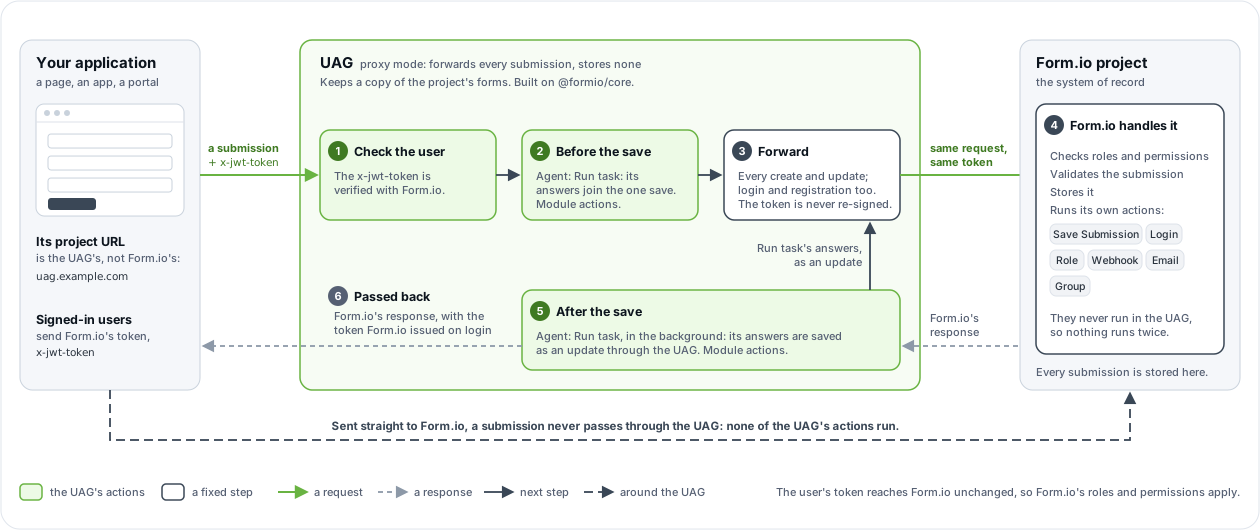
| What |
Runs where |
| Form.io's actions (Save Submission, Login, Role, Webhook, Email, Group) |
At Form.io, on the forwarded request. The UAG never runs them, so nothing runs twice. |
| The UAG's own action, Agent: Run task, and any action a module adds |
In the UAG: before the forward, or after it. |
| The forward itself |
A fixed step of every create and update, between the "before" and "after" actions. |
A Form.io user token (x-jwt-token) works against the UAG as it does against Form.io: the UAG verifies it with Form.io and forwards it unchanged, never re-signed, so Form.io's roles and permissions apply. The exception is a create that a Run task action with an agent role makes on the user's behalf; see Project setup for agents. A submission sent straight to Form.io never passes through the UAG, so none of the UAG's actions run for it.
#The uag tag
The UAG registers only forms and resources tagged uag. In the form builder the tag is under Form Settings → Tags; in Form JSON:
An untagged form is invisible to every agent and every tool, including get_forms and the form's agent operations, {form}/agent/* (which answer 404 "does not exist or is not tagged"). Nothing logs an error. When an agent insists a form does not exist, check the tag first, then wait for the project cache (PROJECT_TTL) or restart the UAG.
A tagged form is all a conversation form needs. An agent reads its fields, labels, descriptions, options and validation through the MCP tools, and the form's chat ({form}/agent/chat) reads the same for the UAG's agent engine. The form's properties.description, if set, is the description get_forms shows; otherwise it shows "A form to submit new
records."</p>
<div class="callout callout-tip"><span class="callout-label">tip</span><p>Field descriptions are agent context as much as help text. A precise description ("The 8-digit account number printed on the invoice") changes how an agent asks for and checks a value.</p>
</div>
<h2 id="tasks"><a class="anchor" href="#tasks" aria-hidden="true">#</a>Tasks</h2>
<p>A <strong>task</strong> is a unit of work the form defines for an agent: what to do, what to read, and which fields to fill. Before UAG 2.0 tasks were called personas; 2.0 removed that name everywhere (see <a href="#earlier-names">Earlier names</a>).</p>
<p>A task is made of components that carry the same value in their <code>uag</code> custom property. That value is the task's name:</p>
<div class="table-wrap"><table>
<thead>
<tr>
<th>Role</th>
<th>How it is flagged</th>
<th>Required</th>
</tr>
</thead>
<tbody><tr>
<td><strong>Criteria</strong></td>
<td>A content component with <code>uag: "<task>"</code> and <code>uagField: "criteria"</code></td>
<td>Required by the <code>agent_provide</code> MCP tool. The Agent API runs without one, but engines then get no instructions, so always add it.</td>
</tr>
<tr>
<td><strong>Agent fields</strong></td>
<td>Any input component, or a container of them, with <code>uag: "<task>"</code></td>
<td>Yes</td>
</tr>
<tr>
<td><strong>Input</strong></td>
<td>A field or container with <code>uag: "<task>"</code> and <code>uagField: "input"</code></td>
<td>No</td>
</tr>
</tbody></table>
</div><p>Custom properties are set in the builder under a component's <strong>API → Custom Properties</strong>, and in Form JSON under <code>properties</code>.</p>
<h3 id="where-tasks-run"><a class="anchor" href="#where-tasks-run" aria-hidden="true">#</a>Where tasks run</h3>
<div class="table-wrap"><table>
<thead>
<tr>
<th>Surface</th>
<th>Saves</th>
<th>Use it for</th>
</tr>
</thead>
<tbody><tr>
<td>The <strong>Agent: Run task</strong> action</td>
<td>Yes. Before the save, its answers are part of the one save; after the save, they are saved as an update through the UAG, which runs the form's update actions, so tasks chain (through actions that run after the save).</td>
<td>Workflows with no person in the loop, and re-deciding sensitive fields on the server. See <a href="/uag/developers/workflows">Workflows</a>.</td>
</tr>
<tr>
<td>The Agent API: <code>{form}/agent/extract</code>, <code>{form}/agent/decide</code>, <code>{form}/agent/generate</code>, under the form's URL on the UAG</td>
<td>No. It is stateless: it answers from the data in the request, and never reads or writes a stored submission.</td>
<td>Pages and applications that fill a form as a person works on it. See <a href="/uag/developers/agent-api">Agent API</a>.</td>
</tr>
<tr>
<td>The <code>agent_provide</code> and <code>agent_decide</code> MCP tools</td>
<td>No. They only read: they hand an MCP client the task, and the client writes with <code>submission_update</code>.</td>
<td>An MCP client that does the task with its own model. See <a href="/uag/developers/mcp-tools">MCP tools</a>.</td>
</tr>
</tbody></table>
</div><p>Run task, the Agent API's extract, decide and generate, and the <code>agent_provide</code> and <code>agent_decide</code> MCP tools are Agentic Formflow, which needs a license that includes the UAG (or, to try it, a 30-day free trial project on portal.form.io); see <a href="/uag/developers/agent-api#licensing">Licensing</a>.</p>
<p><a class="image-link" href="/uag/images/uag-task-anatomy.svg" target="_blank" rel="noopener"><img src="/uag/images/uag-task-anatomy.svg" alt="The demo's First Notice of Loss form: its input, its criteria, two decision fields and two value fields, all in the triage task."></a></p>
<p><a class="image-link" href="/uag/images/criteria-properties.png" target="_blank" rel="noopener"><img src="/uag/images/criteria-properties.png" alt="The custom properties that make a content component a task's criteria."></a></p>
<h3 id="criteria"><a class="anchor" href="#criteria" aria-hidden="true">#</a>Criteria</h3>
<p>The criteria is a content component whose HTML is the task's instructions. The UAG converts it to Markdown and gives it to every engine, and to MCP agents through <code>agent_provide</code>.</p>
<p>Write it as you would brief a new employee: what the submission is, what each field the task fills means, how to judge it, which values are allowed, and in which units and formats. If the task acts in a role (an admissions officer, a claims adjuster), say so here; the criteria is the only place a model learns who it is acting as. Name field keys verbatim when it helps.</p>
<p><a class="image-link" href="/uag/images/criteria-example.png" target="_blank" rel="noopener"><img src="/uag/images/criteria-example.png" alt="An example criteria for scoring a college application essay."></a></p>
<p>The criteria component also carries the task's settings. Any custom property on it other than <code>uag</code> and <code>uagField</code> becomes a task setting; the UAG reads <code>uagContext</code>, <code>uagTools</code> and <code>uagEngine</code> from there.</p>
<p>In a production form, hide the criteria and the agent fields from the rendered form (<code>hidden: true</code>) if users should not see them. The agent still reads them. Hiding only affects rendering: anyone who can read the form definition can read the criteria.</p>
<h3 id="agent-fields"><a class="anchor" href="#agent-fields" aria-hidden="true">#</a>Agent fields</h3>
<p>Every input component with the task's <code>uag</code> value is a field the task fills. Fields do not have to sit next to the criteria: a <code>status</code> field in one panel can belong to one task while the field beside it belongs to another.</p>
<p><a class="image-link" href="/uag/images/agent-field-property.png" target="_blank" rel="noopener"><img src="/uag/images/agent-field-property.png" alt="Agent fields flagged with the task's name."></a></p>
<p>A task only ever fills its own fields. Values an engine returns for any other path are discarded, so a model cannot be talked into writing a field the task does not own.</p>
<h3 id="nested-components"><a class="anchor" href="#nested-components" aria-hidden="true">#</a>Nested components</h3>
<p>Flag a container (a Panel, Fieldset, Well, Tabs, Columns, Table or Container) with <code>uag: "<task>"</code> and every input inside it belongs to the task. Only <code>uag</code> applies to what is inside: set <code>uagAuthoritative</code>, <code>uagAgentDecides</code>, <code>uagEngine</code> and the decision settings on each field. This is the usual way to give a task a whole "For office use only" section.</p>
<p>Fields inside repeating rows (a Data Grid or Edit Grid) are not answered. They are listed in the response's <code>excluded</code> with the reason <code>inside repeating rows</code>.</p>
<h3 id="the-input"><a class="anchor" href="#the-input" aria-hidden="true">#</a>The input</h3>
<p>By default a task reads the whole submission, except the fields it is filling. Flag a field with <code>uagField: "input"</code> to make it the task's source instead: a "Describe what happened" text area, for example.</p>
<div class="code"><div class="code-bar"><span>json</span><button type="button" class="copy" data-copy>Copy</button></div><pre><code class="language-json">{ "type": "textarea", "key": "lossDescription", "label": "What happened?", "input": true,
"properties": { "uag": "triage", "uagField": "input" } }</code></pre></div>
<p>An input can also be a container, in which case every value inside it is input. A task can have several inputs. A file component given as input or context reaches engines as the uploaded document's text; any other file is described by name, type and size, never sent (see <a href="/uag/developers/form-properties#documents-as-input">Documents as input</a>).</p>
<p>The input matters most for <code>{form}/agent/extract</code>, which fills a task's fields from free text. Extract needs either a task with an input (and the input's value in <code>data</code>) or a <code>text</code> value in the request, which replaces the input for that call.</p>
<h3 id="context"><a class="anchor" href="#context" aria-hidden="true">#</a>Context</h3>
<p>Engines are deliberately given very little: unrelated detail lowers decision accuracy. For each task they receive exactly:</p>
<div class="table-wrap"><table>
<thead>
<tr>
<th>Key</th>
<th>Content</th>
</tr>
</thead>
<tbody><tr>
<td><code>instructions</code></td>
<td>The criteria, as Markdown.</td>
</tr>
<tr>
<td><code>input</code></td>
<td>The input field values keyed by label (or the request's <code>text</code> under the label <code>Input</code>). Without an input, every filled value in the submission except the fields being answered.</td>
</tr>
<tr>
<td><code>context</code></td>
<td>The values at the paths listed in the criteria's <code>uagContext</code>, keyed by label.</td>
</tr>
<tr>
<td><code>today</code></td>
<td>Today's date, for example <code>Friday, October 23, 2026 (2026-10-23)</code>.</td>
</tr>
</tbody></table>
</div><p>To give a task one or two extra values without making them input, list their data paths in <code>uagContext</code> on the criteria component:</p>
<div class="code"><div class="code-bar"><span>json</span><button type="button" class="copy" data-copy>Copy</button></div><pre><code class="language-json">"properties": { "uag": "triage", "uagField": "criteria", "uagContext": "policyNumber, customer.tier" }</code></pre></div>
<p>Agent engines also receive each target field's label, type, description, rule, format and options, and a JSON schema for the answer. The rule states the field's validation too: lengths, word counts, the pattern, the range, the input mask and fixed date limits (not <code>required</code>, so an engine is never pushed to invent a value, and not custom validation, which cannot be stated). The form still validates every answer; see <a href="/uag/developers/workflows#values-the-form-refuses">Values the form refuses</a>. Decision engines receive compiled questions (see <a href="#how-decisions-are-asked">How decisions are asked</a>).</p>
<p>When a task lists research tools in <code>uagTools</code>, an agent engine may also call those read-only tools before it answers. See <a href="/uag/developers/security#research-identity">Security</a>.</p>
<h2 id="multiple-tasks"><a class="anchor" href="#multiple-tasks" aria-hidden="true">#</a>Multiple tasks</h2>
<p>A form can define several tasks, each with its own criteria and fields. This models a process with stages: in a college application, an <code>admissions</code> task decides whether to admit, and a <code>finance</code> task, with entirely different criteria, assesses aid for the admitted applicants.</p>
<div class="code"><div class="code-bar"><span>json</span><button type="button" class="copy" data-copy>Copy</button></div><pre><code class="language-json">[
{ "key": "admissionsCriteria", "type": "content", "properties": { "uag": "admissions", "uagField": "criteria" } },
{ "key": "financeCriteria", "type": "content", "properties": { "uag": "finance", "uagField": "criteria" } },
{ "key": "status", "type": "select", "data": { "values": [{ "label": "Accepted", "value": "accepted" }, { "label": "Declined", "value": "declined" }] },
"properties": { "uag": "admissions" } },
{ "key": "awardLevel", "type": "select", "data": { "values": [{ "label": "Full Ride", "value": "fullRide" }, { "label": "$1000 Reward", "value": "reward1000" }] },
"properties": { "uag": "finance" } }
]</code></pre></div>
<p>When a request names no task:</p>
<div class="table-wrap"><table>
<thead>
<tr>
<th>Operation</th>
<th>Tasks that run</th>
</tr>
</thead>
<tbody><tr>
<td><code>{form}/agent/decide</code>, <code>{form}/agent/generate</code></td>
<td>Every task, each with its own criteria</td>
</tr>
<tr>
<td><code>{form}/agent/extract</code></td>
<td>Every task with an input, or every task when <code>text</code> is given</td>
</tr>
<tr>
<td><code>agent_provide</code>, <code>agent_decide</code> (MCP)</td>
<td>The form's first task</td>
</tr>
</tbody></table>
</div><p>An <strong>Agent: Run task</strong> action always names its task: a saving operation never guesses which stage to run.</p>
<p>Chaining tasks, so that the first task's save starts the second, is covered in <a href="/uag/developers/workflows#chaining-tasks">Workflows</a>.</p>
<h2 id="decision-fields-and-value-fields"><a class="anchor" href="#decision-fields-and-value-fields" aria-hidden="true">#</a>Decision fields and value fields</h2>
<p>The UAG sorts every target field into one of two kinds, and routes each kind to a different type of engine.</p>
<div class="table-wrap"><table>
<thead>
<tr>
<th>Kind</th>
<th>Components</th>
<th>Answered by</th>
<th>Result status</th>
</tr>
</thead>
<tbody><tr>
<td><strong>Decision</strong></td>
<td>Radio and select with static values, single or multiple (a multiple select is asked as one yes/no question per option); checkbox; select boxes; survey; single-value resource selects whose whole resource fits the decision engine's option limit (255 for Jev)</td>
<td>A decision engine, with a calibrated confidence. If none answers, an agent engine as a fallback, uncalibrated.</td>
<td><code>confident</code>, <code>uncertain</code> or <code>missing</code> (<code>suggested</code> from an agent engine)</td>
</tr>
<tr>
<td><strong>Value</strong></td>
<td>Everything else: text, dates, numbers, currency, emails, multi-value or large resource selects, selects fed by a URL</td>
<td>An agent engine</td>
<td><code>suggested</code> or <code>missing</code></td>
</tr>
</tbody></table>
</div><p>The <code>uag*</code> switches (<code>uagAuthoritative</code>, <code>uagAgentDecides</code>, <code>uagScale</code>, <code>uagOrderCheck</code>, and the form's <code>uagAnonymous</code> and <code>uagChat</code>) take <code>"true"</code> or <code>"false"</code> as the portal saves them, or a JSON boolean.</p>
<p>A radio or single select whose options exceed the decision engine's limit becomes a value field. <code>uagEngine</code> on a component, or on the criteria for the whole task, overrides the routing.</p>
<h3 id="statuses"><a class="anchor" href="#statuses" aria-hidden="true">#</a>Statuses</h3>
<div class="table-wrap"><table>
<thead>
<tr>
<th>Status</th>
<th>Meaning</th>
</tr>
</thead>
<tbody><tr>
<td><code>confident</code></td>
<td>A decision engine answered at or above the field's threshold, and every consistency check agreed. Never given to a value that fails the form's validation.</td>
</tr>
<tr>
<td><code>uncertain</code></td>
<td>A decision engine answered, but below the threshold, or the answer changed when the options were reversed, or it was unclear whether the input addresses the field at all. Up to three <code>alternatives</code> are included.</td>
</tr>
<tr>
<td><code>suggested</code></td>
<td>An agent engine wrote the value. Agent engines are not calibrated, so their values are always suggestions for a person or a rule to confirm.</td>
</tr>
<tr>
<td><code>missing</code></td>
<td>No answer: the input does not mention the field, the engine returned nothing usable, or no engine could answer. <code>reason</code> says which.</td>
</tr>
</tbody></table>
</div><h3 id="how-decisions-are-asked"><a class="anchor" href="#how-decisions-are-asked" aria-hidden="true">#</a>How decisions are asked</h3>
<p>Decision engines are asked closed questions, compiled from the component, with checks against the known failure modes of decision models:</p>
<ul>
<li><strong>Choice</strong> (radio, select, a survey row): one question over the option labels, asked again with the options in reverse order. If the answer changes, the field is <code>uncertain</code>. Disable the second question with <code>uagOrderCheck: "false"</code>.</li>
<li><strong>Score</strong> (an ordered radio or select with <code>uagScale: "true"</code> and a description for every option in <code>uagOptionDescriptions</code>, 2 to 10 levels): one question over the described levels.</li>
<li><strong>Mention check</strong>: every choice and score is paired with a yes/no question, "does the input address this at all?". Below the uncertain band the field is left empty ("not mentioned"); inside the band it is <code>uncertain</code>. This is how "nobody was hurt" is told apart from not mentioning injuries.</li>
<li><strong>Yes/no</strong> (checkbox, each select-box option): two literal questions, "does the input affirm this?" and "does it deny it?". True needs a clear affirmation and no denial, false the reverse, neither is "not mentioned", anything else is <code>uncertain</code>.</li>
<li><strong>Resource match</strong> (resource select): a choice over every record of the resource, labeled with the component's template. When the input clearly names a record that is not on file, the field is <code>missing</code> with <code>noMatch: true</code>, and, when an agent engine is enabled, <code>newRecordName</code> carries the name the input used.</li>
</ul>
<p>Thresholds are set per field with <code>uagThreshold</code> (choice and score, default <code>0.5</code>) and <code>uagUncertainBand</code> (yes/no and mention checks, default <code>0.2-0.8</code>). Measure them on your own data before relying on the defaults; see <a href="/uag/developers/evaluation">Evaluation</a>.</p>
<h3 id="what-gets-excluded"><a class="anchor" href="#what-gets-excluded" aria-hidden="true">#</a>What gets excluded</h3>
<p>Every response lists target fields that were not answered, with a reason:</p>
<div class="table-wrap"><table>
<thead>
<tr>
<th>Reason</th>
<th>Why</th>
</tr>
</thead>
<tbody><tr>
<td><code>already has a value</code></td>
<td>The field is filled, and <code>overwrite</code> is not set (stateless operations), or it is a value field in a Run task run.</td>
</tr>
<tr>
<td><code>hidden by the form's conditionals</code></td>
<td>The field is conditionally hidden for this data. Server-side reconciliation still re-decides hidden decision fields.</td>
</tr>
<tr>
<td><code>inside repeating rows</code></td>
<td>The field is inside a Data Grid or Edit Grid.</td>
</tr>
<tr>
<td><code>not requested</code></td>
<td>Decide asked for decision fields only, or generate for value fields only.</td>
</tr>
<tr>
<td><code>holds the confidence of another field</code></td>
<td>The field is another field's <code>uagConfidenceField</code>; it is written with that decision, never answered on its own.</td>
</tr>
</tbody></table>
</div><h2 id="reconciliation-and-provenance"><a class="anchor" href="#reconciliation-and-provenance" aria-hidden="true">#</a>Reconciliation and provenance</h2>
<p>Stateless operations (extract, decide, generate) return values and save nothing. <strong>Agent: Run task</strong> reconciles the answers with what the submission holds (the submitted data before the save, the stored submission after it):</p>
<ul>
<li><strong>Decision fields</strong> take a <code>confident</code> answer. Otherwise they keep their stored value, which a person may have confirmed, unless the field is marked <code>uagAuthoritative: "true"</code>, in which case an answer that is not confident (including an agent engine's <code>suggested</code> answer, without <code>uagAgentDecides</code>) clears it so a person decides. A field marked <code>uagAgentDecides: "true"</code> also takes an agent engine's <code>suggested</code> answer.</li>
<li><strong>Value fields</strong> take a generated value only while they are empty and visible. A generated value never replaces one already there, so running a task again on its own output changes nothing.</li>
<li><strong>Fields the task owns.</strong> For every task a form's Run task actions run, values a client sends for the task's <code>uagAuthoritative</code> fields (decision and value fields alike, and their confidence fields) are removed before anything runs: on a create they start empty, on an update they keep their stored values. Only the task sets them. See <a href="/uag/developers/form-properties#uagauthoritative"><code>uagAuthoritative</code></a>.</li>
</ul>
<p>Every reconciled value is recorded in the submission's metadata, next to the data:</p>
<div class="code"><div class="code-bar"><span>json</span><button type="button" class="copy" data-copy>Copy</button></div><pre><code class="language-json">"metadata": {
"uag": {
"decisions": {
"category": {
"engine": "jev",
"model": "jev-1.13.0",
"probabilities": {
"choice:category": { "Billing": 0.95, "Outage": 0.025, "Other": 0.025 },
"choice-reversed:category": { "Billing": 0.95, "Other": 0.025, "Outage": 0.025 },
"mention:category": { "yes": 0.9 }
},
"confidence": 0.925,
"at": "2026-10-23T10:24:27.073Z",
"status": "confident",
"source": "server",
"serverValue": "billing"
}
},
"generated": {
"summary": { "engine": "claude", "model": "claude-opus-5-5", "status": "suggested", "at": "2026-10-23T10:24:27.073Z" }
}
}
}</code></pre></div>
<div class="table-wrap"><table>
<thead>
<tr>
<th>Field</th>
<th>Meaning</th>
</tr>
</thead>
<tbody><tr>
<td><code>decisions[path].source</code></td>
<td><code>server</code>: the server's answer was written. <code>client</code>: the stored or submitted value was kept. <code>cleared</code>: an authoritative field was emptied. <code>none</code>: nothing was kept and nothing written.</td>
</tr>
<tr>
<td><code>decisions[path].serverValue</code></td>
<td>What the server decided, even when it was not written.</td>
</tr>
<tr>
<td><code>decisions[path].probabilities</code></td>
<td>The engine's probabilities for each compiled question, at most the top 10 options per question.</td>
</tr>
<tr>
<td><code>generated[path]</code></td>
<td>The engine and model that wrote a value field, and when.</td>
</tr>
</tbody></table>
</div><p>With Form.io Enterprise, submission revisions add who changed what afterwards, so an audit can follow a value from the model to the person who confirmed or corrected it.</p>
<h2 id="what-the-uag-stores"><a class="anchor" href="#what-the-uag-stores" aria-hidden="true">#</a>What the UAG stores</h2>
<p>By default, nothing: submissions stay in Form.io, and the UAG keeps only a copy of the project's forms in memory. Runs after the save then run in the process that received the submission, and are lost if it stops.</p>
<p>Optionally, the UAG has a MongoDB database of its own (<code>MONGO</code>, with the database named by <code>UAG_DATABASE</code>, default <code>uag</code>). It holds only the UAG's state, in collections named <code>uag-*</code>, never submissions:</p>
<div class="table-wrap"><table>
<thead>
<tr>
<th>Collection</th>
<th>Holds</th>
<th>Enables</th>
</tr>
</thead>
<tbody><tr>
<td><code>uag-taskruns</code></td>
<td>A record of each Run task run: its task, status, the engines that answered and the paths it wrote (never the values)</td>
<td>Run records in the project's Action Logs and, for actions with an agent role, runs after the save that survive a restart and are taken by one replica at a time</td>
</tr>
<tr>
<td><code>uag-authcodes</code></td>
<td>Authorization codes for remote MCP clients, stored by their SHA-256 hash, with their tokens sealed</td>
<td>OAuth sign-in for remote MCP clients (<code>MCP_OAUTH</code>)</td>
</tr>
<tr>
<td><code>uag-meta</code></td>
<td>The database's schema version</td>
<td>The startup check</td>
</tr>
</tbody></table>
</div><p>Using the database needs a license that includes the UAG. Without it, the UAG still starts, with these features off, and says why. See <a href="/uag/developers/deployment">Deployment</a>.</p>
<h2 id="a-complete-example"><a class="anchor" href="#a-complete-example" aria-hidden="true">#</a>A complete example</h2>
<p>This form has one task, <code>triage</code>, with an input, a criteria that adds one context value, two decision fields (one of which writes its confidence to a companion field) and one value field. It is the form the <a href="/uag/developers/agent-api">Agent API</a> examples use.</p>
<div class="code"><div class="code-bar"><span>json</span><button type="button" class="copy" data-copy>Copy</button></div><pre><code class="language-json">{
"title": "Support Request",
"name": "supportRequest",
"path": "supportrequest",
"type": "form",
"tags": ["uag"],
"components": [
{ "type": "textarea", "key": "description", "label": "What happened?", "input": true,
"properties": { "uag": "triage", "uagField": "input" } },
{ "type": "textfield", "key": "accountNumber", "label": "Account number", "input": true },
{ "type": "content", "key": "triageCriteria", "input": false,
"html": "<p>You triage support requests. Choose the category and whether the request is urgent from the description. Write a one-sentence summary.</p>",
"properties": { "uag": "triage", "uagField": "criteria", "uagContext": "accountNumber" } },
{ "type": "radio", "key": "category", "label": "Category", "input": true,
"values": [
{ "label": "Billing", "value": "billing" },
{ "label": "Outage", "value": "outage" },
{ "label": "Other", "value": "other" }
],
"properties": { "uag": "triage", "uagThreshold": "0.6", "uagConfidenceField": "categoryConfidence" } },
{ "type": "number", "key": "categoryConfidence", "label": "Category confidence", "input": true,
"properties": { "uag": "triage" } },
{ "type": "checkbox", "key": "urgent", "label": "Urgent", "input": true,
"properties": { "uag": "triage" } },
{ "type": "textfield", "key": "summary", "label": "Summary", "input": true,
"properties": { "uag": "triage" } },
{ "type": "button", "key": "submit", "label": "Submit", "input": true, "action": "submit" }
]
}</code></pre></div>
<p>What the UAG makes of it:</p>
<div class="table-wrap"><table>
<thead>
<tr>
<th>Path</th>
<th>Kind</th>
<th>Notes</th>
</tr>
</thead>
<tbody><tr>
<td><code>description</code></td>
<td>Input</td>
<td>Sent to engines under its label, "What happened?".</td>
</tr>
<tr>
<td><code>accountNumber</code></td>
<td>Context</td>
<td>Sent under <code>context</code> because the criteria lists it. Not a target.</td>
</tr>
<tr>
<td><code>category</code></td>
<td>Decision (choice)</td>
<td>Confident at 0.6 or above. Its confidence is written to <code>categoryConfidence</code>.</td>
</tr>
<tr>
<td><code>categoryConfidence</code></td>
<td>Excluded</td>
<td>Holds another field's confidence.</td>
</tr>
<tr>
<td><code>urgent</code></td>
<td>Decision (yes/no)</td>
<td>Affirm and deny questions, judged against the uncertain band.</td>
</tr>
<tr>
<td><code>summary</code></td>
<td>Value</td>
<td>Written by an agent engine as <code>suggested</code>.</td>
</tr>
</tbody></table>
</div><h2 id="earlier-names"><a class="anchor" href="#earlier-names" aria-hidden="true">#</a>Earlier names</h2>
<p>Tasks were called personas before UAG 2.0, and 2.0 removed the old names: the MCP tools take <code>task</code> (and <code>agent_provide_data</code> is <code>agent_provide</code>), <code>uag-eval</code> takes <code>--task</code>, and the Agent API refuses a body that names <code>persona</code> and no <code>task</code>. See <a href="https://github.com/formio/uag/blob/v2.0.2/MIGRATING-2.0.md">MIGRATING-2.0.md</a>.</p>
<nav class="pager" aria-label="More pages"><a class="pager-prev" href="/uag/developers/quickstart"><small>Previous</small>Quickstart</a><a class="pager-next" href="/uag/developers/form-properties"><small>Next</small>Form properties</a></nav>
</article>
<aside class="docs-toc">
<h4>On this page</h4>
<ul><li><a href="#the-uag-in-front-of-formio">The UAG in front of Form.io</a></li><li><a href="#the-uag-tag">The uag tag</a></li><li><a href="#tasks">Tasks</a></li><li><a href="#multiple-tasks">Multiple tasks</a></li><li><a href="#decision-fields-and-value-fields">Decision fields and value fields</a></li><li><a href="#reconciliation-and-provenance">Reconciliation and provenance</a></li><li><a href="#what-the-uag-stores">What the UAG stores</a></li><li><a href="#a-complete-example">A complete example</a></li><li><a href="#earlier-names">Earlier names</a></li></ul>
<a class="edit" href="https://github.com/formio/uag/blob/main/demo/content/developers/concepts.md" target="_blank" rel="noopener">Edit this page on GitHub</a>
</aside>
</div>
</main>
<footer class="site-footer">
<div class="container">
<p>© 2026 Form.io LLC. All rights reserved. The UAG and the Agentic Coding Plugin are open source under the MIT license.</p>
</div>
</footer>
<script src="/uag/js/site.js?v=2.0.2" defer></script>
</body>
</html>
