
Run the UAG yourself.
The UAG is one container that sits beside Form.io, inside your own environment: from a laptop to an air-gapped data center. Run it with Form.io Enterprise for production, try it on Form.io Open Source, or try it free for 30 days against a trial project on portal.form.io.
Enterprise, self-hosted
Form.io Enterprise and the UAG inside your security boundary, with RBAC, revisions, stage deployments and support.
Open Source stack
Form.io Open Source, MongoDB and the UAG in one Docker Compose file, on your own machine or network.
30-day free trial
Start a 30-day free trial project on portal.form.io and run the UAG yourself against it, to try Agentic Formflow and agentic workflows before you deploy.
Get a license
A self-hosted UAG serving a Form.io Enterprise project needs a Form.io license that includes the UAG, in LICENSE_KEY: an online license with UAG servers, or an offline license with the uag option. It is the only license the UAG needs, and covers the Agent API, "Agent: Run task" actions, their engines, the AI Document and the UAG's own database. Ask us for a trial.
Point the UAG at your project
  formio-uag:
    image: formio/uag
    restart: always
    environment:
      # A container-to-container address: the UAG never needs a public one.
      PROJECT: http://formio-enterprise:3000/yourproject
      PROJECT_KEY: ${PROJECT_KEY}
      LICENSE_KEY: ${LICENSE_KEY}
      # The Form.io server's own secret, so Run task actions can act with an agent role.
      JWT_SECRET: ${JWT_SECRET}
      LOGIN_FORM: https://forms.example.com/yourproject/user/login
      UAG_ENGINES: jev,claude
      TYPESAFE_API_KEY: ${TYPESAFE_API_KEY}
      CLAUDE_API_KEY: ${CLAUDE_API_KEY}
Keep model keys out of the gateway (optional)
Run the engines on formio/uag-engines, or use a local model through Ollama or vLLM so no data leaves your network. Engine setups.
Harden it
Raise PROJECT_TTL, set real secrets, scope roles and permissions, and decide whether remote agents may sign in (MCP_OAUTH). Deployment guide · Security model.
Save this as docker-compose.yml
Form.io Open Source, MongoDB and the UAG. Change every CHANGEME before you use it for anything real.
services:
  mongo:
    image: mongo:7
    restart: always
    volumes:
      - mongo-data:/data/db

  formio:
    image: formio/formio
    restart: always
    depends_on: [mongo]
    ports:
      - "3000:3001"
    environment:
      NODE_CONFIG: '{"mongo": "mongodb://mongo:27017/formio", "jwt": {"secret": "CHANGEME"}, "mongoSecret": "CHANGEME"}'
      ROOT_EMAIL: admin@example.com
      ROOT_PASSWORD: CHANGEME
      ADMIN_KEY: CHANGEME
    healthcheck:
      # The UAG loads the project at startup, so hold it back until Form.io answers.
      test: ["CMD", "node", "-e", "fetch('http://localhost:3001/').then(r => process.exit(r.ok ? 0 : 1)).catch(() => process.exit(1))"]
      interval: 5s
      timeout: 5s
      retries: 40

  formio-uag:
    image: formio/uag
    restart: always
    depends_on:
      formio:
        condition: service_healthy
    ports:
      - "3200:3200"
    environment:
      PROJECT: http://formio:3001
      ADMIN_KEY: CHANGEME
      JWT_SECRET: CHANGEME
      LOGIN_FORM: http://localhost:3000/user/login
      # Re-read the project every 10 seconds, so a form you tag shows up quickly.
      PROJECT_TTL: 10

volumes:
  mongo-data:
Start it
docker compose up -d
# Then browse to http://localhost:3000, the Form.io portal: admin@example.com / CHANGEME
Tag a form and connect
Create a form in the portal, tag it uag, and connect an agent to http://localhost:3200/mcp. Everything stays on your machine. Conversation forms over MCP run here with no license. The chat widget needs no license either, but needs an agent engine: add UAG_ENGINES: claude and CLAUDE_API_KEY to the UAG. The Agent API's extract, decide and generate, workflows, Agentic Formflow and the AI Document need a LICENSE_KEY that includes the UAG, or, to try them, a 30-day free trial project (tab 3).
Start a 30-day free trial
Sign up for a 30-day free trial on portal.form.io and create a project. Its API endpoint looks like https://yourproject.form.io. The trial is for trying the UAG; for production, run it self-hosted with Form.io Enterprise (tab 1).
Make a form visible to agents
Build or open a form, and add the tag uag under Settings → Tags. Only tagged forms are offered to agents; everything else stays invisible to them.
Create a project API key
In Project Settings → API Keys, add a key for the UAG. It stays on your server and is never given to a model.
Run the UAG next to your applications
Against a trial project, the UAG needs no license of its own. Add UAG_ENGINES and a model key to use the Agent API. PROJECT_TTL=60 picks up a form you add or change within a minute.
docker run -d --name formio-uag -p 3200:3200 \
  -e PROJECT=https://yourproject.form.io \
  -e PROJECT_KEY=your-project-api-key \
  -e JWT_SECRET=$(openssl rand -hex 32) \
  -e LOGIN_FORM=https://yourproject.form.io/user/login \
  -e PROJECT_TTL=60 \
  -e UAG_ENGINES=claude \
  -e CLAUDE_API_KEY=your-anthropic-key \
  formio/uag
Connect an agent
Point an MCP client at http://localhost:3200/mcp with a token from /auth/token, or call the Agent API from your own code. Browser sign-in for Claude Desktop and claude.ai (MCP_OAUTH) also needs the UAG's database, and with it a license. See the options below.
Make a form agent-ready.
You set them in the form builder, without code. The form keeps working for people, with a section an agent fills in.
- Tag it
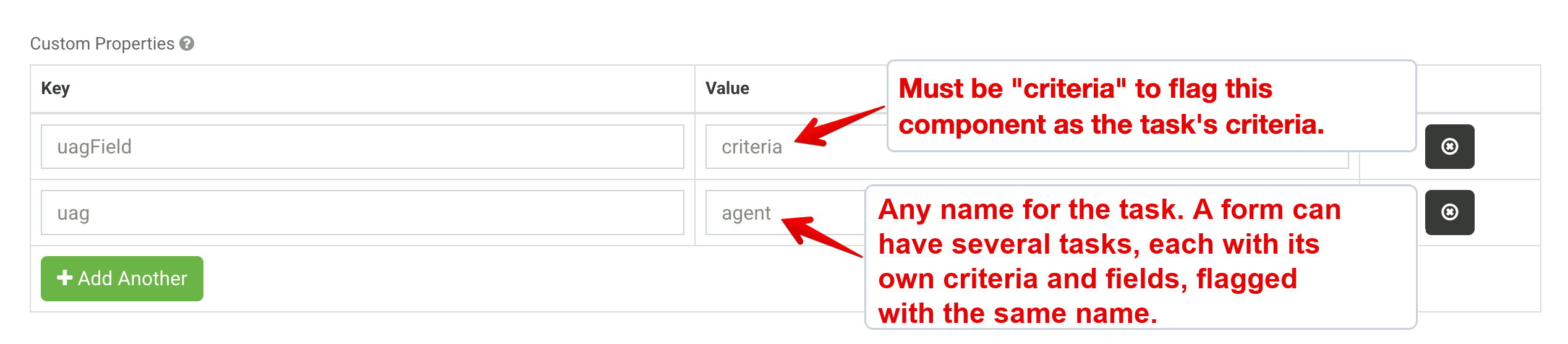
uagThe UAG registers only tagged forms, so you decide exactly what agents can see. - Write the criteriaA content component with
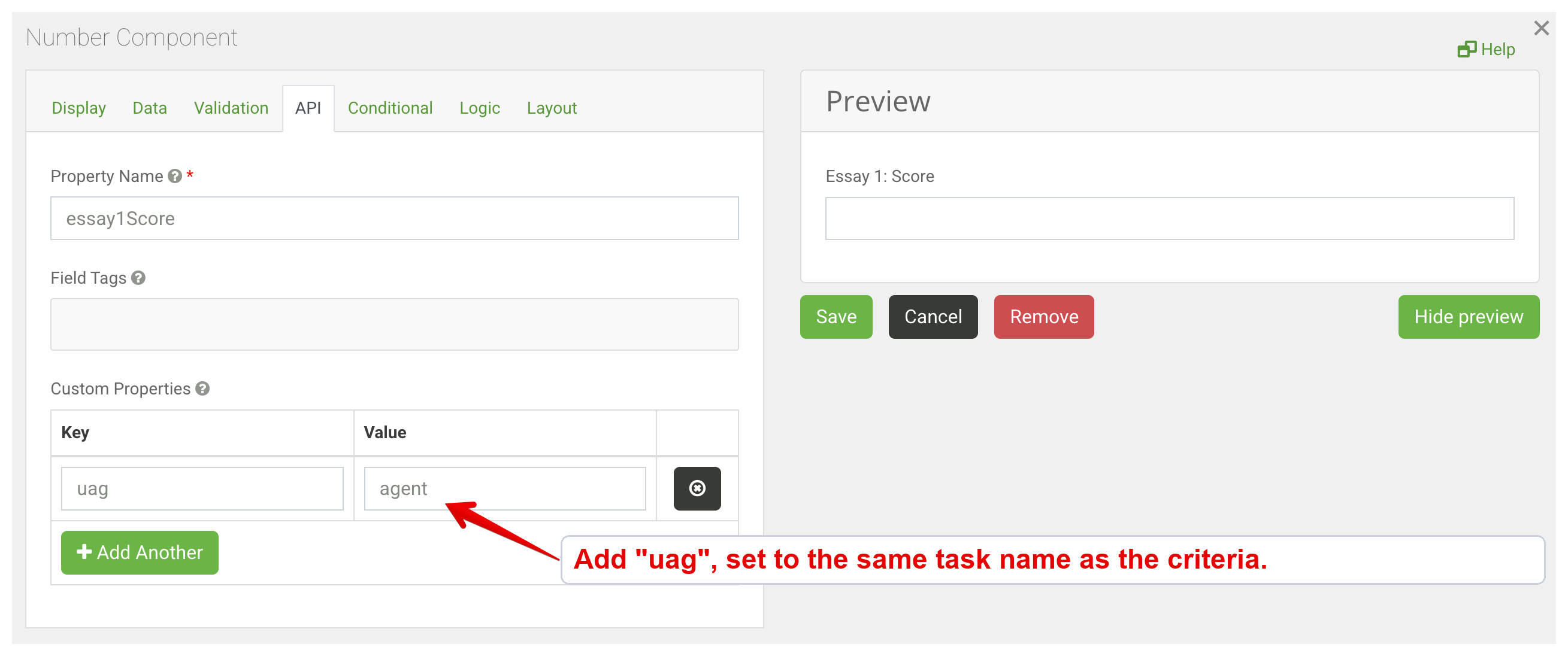
uag=<task>anduagField=criteria: plain-language instructions, like onboarding a new employee. - Flag the agent fieldsGive each field the agent fills the same
uagproperty, or wrap them in a panel that carries it. - Name the input (optional)Give the free-text field a person types into
uagField=input, so@formio/uag-jsandagent/extractfill the task from it. - Trigger itFrom a chat over MCP,
@formio/uag-jsas users type, or an "Agent: Run task" action when a submission is saved through the UAG.
Or ask your coding agent: "Make our claim form agent-ready, with a triage task that decides the claim type from the description." Agentic Coding Plugin
Connect an agent.
There are three ways to connect. Each one authenticates, runs with the caller's permissions and writes only validated data.
Turn on browser sign-in on the UAG with MCP_OAUTH=true and a database (MONGO), then add the UAG to claude_desktop_config.json. The first connection opens your Form.io login, and Claude then acts with that user's roles. The database needs a license that includes the UAG, in LICENSE_KEY.
{
  "mcpServers": {
    "formio-uag": {
      "command": "npx",
      "args": ["mcp-remote", "http://localhost:3200/mcp"]
    }
  }
}
Then ask: "I would like to add a new customer." Full guide, including claude.ai connectors.
Server-side clients exchange the project key for a token, then connect over streamable HTTP. Nothing dials back in, so the UAG can stay private. Run npm install @modelcontextprotocol/sdk, save this as client.mjs, and run it with Node.js 22 or newer.
import { Client } from '@modelcontextprotocol/sdk/client/index.js';
import { StreamableHTTPClientTransport } from '@modelcontextprotocol/sdk/client/streamableHttp.js';

const { access_token } = await (await fetch('http://localhost:3200/auth/token', {
  method: 'POST',
  headers: { 'Content-Type': 'application/json' },
  body: JSON.stringify({
    grant_type: 'client_credentials',
    client_id: 'yourproject-x-token',   // formio-oss-x-admin-key on Open Source
    client_secret: process.env.PROJECT_KEY,
  }),
})).json();

const mcp = new Client({ name: 'my-app', version: '1.0.0' });
await mcp.connect(new StreamableHTTPClientTransport(new URL('http://localhost:3200/mcp'), {
  requestInit: { headers: { Authorization: `Bearer ${access_token}` } },
}));
console.log((await mcp.listTools()).tools.map((tool) => tool.name));
await mcp.close();Fill a task's fields from free text. Decisions come from a decision engine, open values from an agent engine, and nothing is saved until you say so. The operations are under the form's URL on the UAG. This call assumes a form claim with a triage task, like the demo's (its template). On Open Source, leave out /yourproject and send x-admin-key: $ADMIN_KEY.
curl -X POST http://localhost:3200/yourproject/claim/agent/extract \
  -H 'Content-Type: application/json' \
  -H "x-token: $PROJECT_KEY" \
-d '{"task": "triage", "text": "Someone rear-ended me on Main St this morning. My neck hurts."}'Need help going live?
Get a UAG license, architecture guidance and enterprise support for self-hosted deployments.