
How the UAG works
The architecture of the Form.io Universal Agent Gateway, how it reads your project, and the request flow of each of its four usage patterns.
The Universal Agent Gateway (UAG) is a server that sits between AI agents and a Form.io project. It reads the project's forms and gives agents two things: context they can understand, and a governed way to write data back. Everything an agent knows about your data (which forms exist, what each field means, which values are valid, what a task should decide) comes from Form JSON that you already manage in Form.io.
This page explains the moving parts. If you want to run something first, go to the Quickstart and come back.
To have your coding agent build this for you instead, install the Agentic Coding Plugin with npx skills add formio/ai. Its formio-uag skill tags your forms, designs their tasks, deploys the UAG and wires your application to it.
Forms are the contract
The Form.io JavaScript renderer turns Form JSON into an interface a person can use: labels, inputs, validation messages, conditional pages. The UAG does the same thing for an agent. It turns the same Form JSON into Markdown and structured JSON that a model can read: each field's data path, type, description, allowed options, format and validation rules, plus instructions written in the form itself.
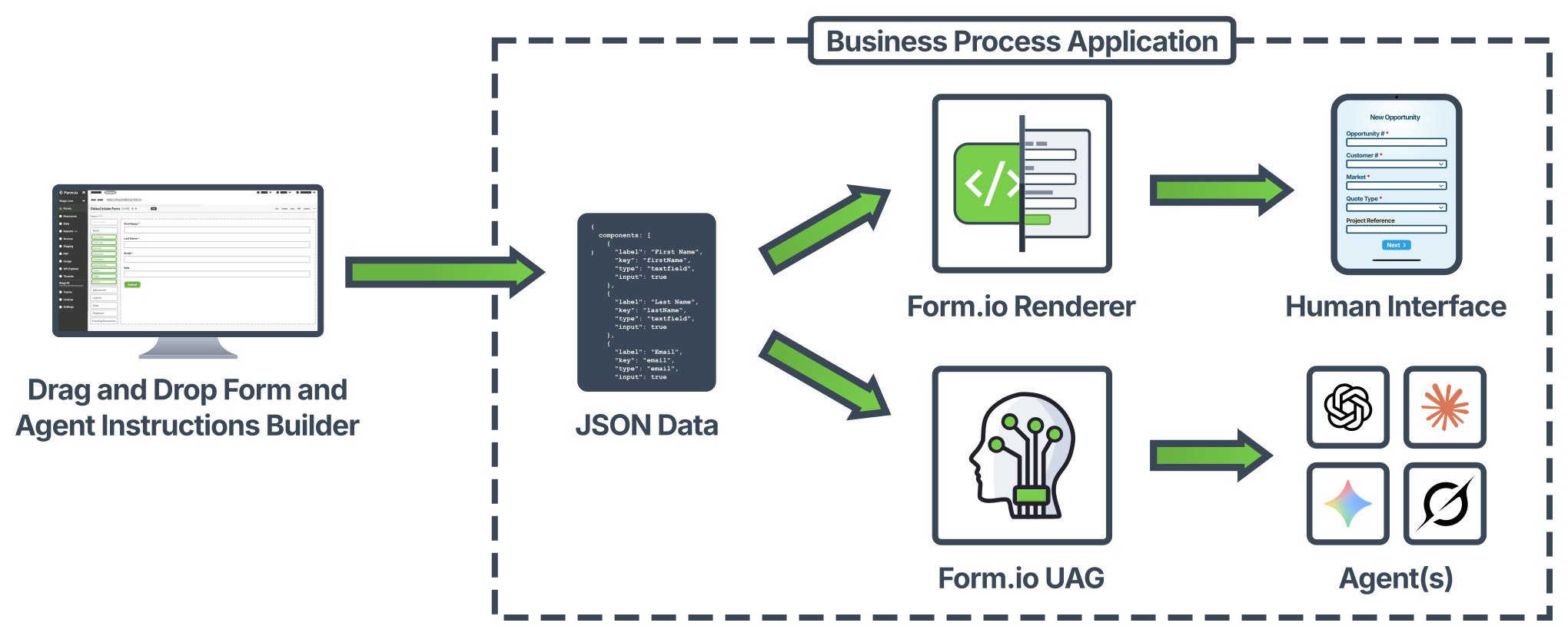
Because the form is the contract, the behavior of every agent connected to the UAG follows the form:
- Add a field and agents start asking for it.
- Change an option list and agents offer the new options and reject the old ones.
- Rewrite a criteria block and an autonomous task decides differently on the next submission.
None of this needs a redeploy, a prompt change or a retrained model. The UAG picks up the change on its next project refresh (see Project sync and caching).
The form also stays the gate on writes. Every value an agent proposes is validated by the form's own rules on the server before it is saved, and every call runs with a Form.io identity whose roles and permissions apply.
The layers
The UAG is built from layers that either supply context to the agent or accept deterministic data from it.
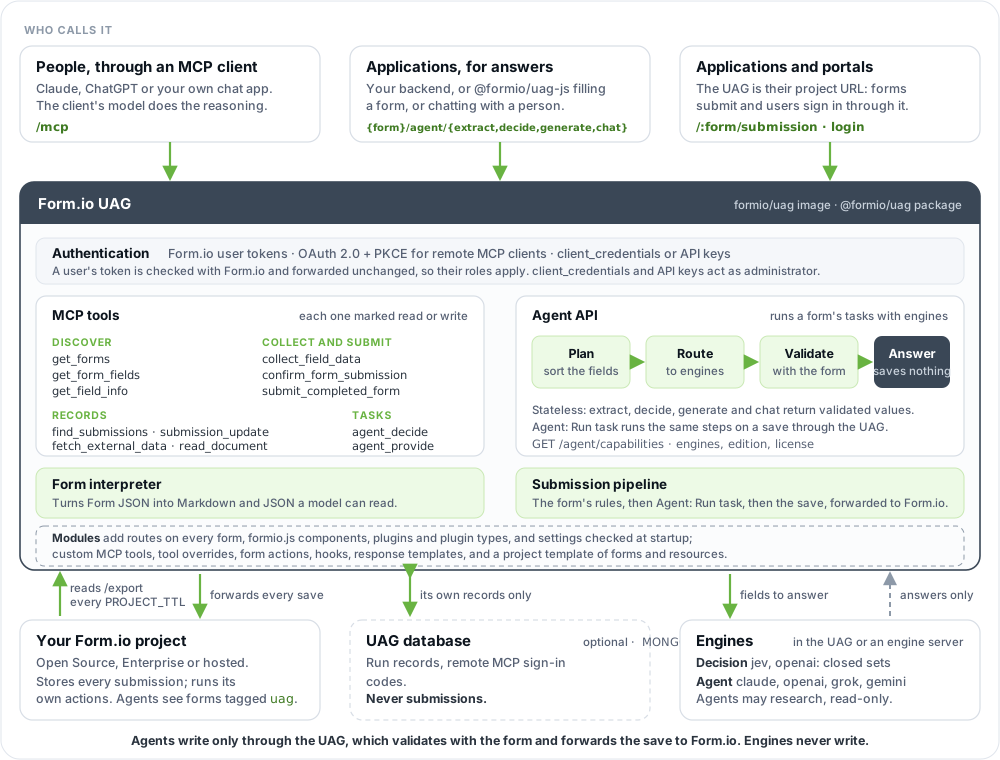
| Layer | What it does | Where to read more |
|---|---|---|
| MCP interface | /mcp serves the Model Context Protocol over Streamable HTTP. Each request gets its own MCP server instance (stateless mode), so concurrent requests never share a transport. |
MCP tools |
| Agent API | {form}/agent/*, under each form's URL on the UAG, runs a form's tasks inside the UAG with model engines you enable, and returns validated values. It is the HTTP surface for applications. It saves nothing. |
Agent API |
| Authentication | Form.io's own: a Form.io user token works against the UAG as against Form.io, and is forwarded unchanged. For MCP, the UAG issues its own tokens: servers use the client_credentials grant or an admin credential, and remote MCP clients can sign users in through an OAuth 2.0 flow with PKCE (MCP_OAUTH), with whatever login the project uses (Form.io login, SAML, OIDC, custom). |
Security |
| Built-in tools | Twelve MCP tools that list forms, describe fields, validate and collect data, submit, search, update, expose tasks, and read uploaded documents. Each is annotated as read or write. | MCP tools |
| Custom tools and actions | A module can add MCP tools, override the built-in ones, and add form actions: Express middleware that runs after the UAG has validated what an agent sent. It can also add form routes, formio.js components, settings and plugins, such as converters that read other file types. | Modules |
| Built-in actions | The UAG forwards every submission to Form.io, which runs the form's own actions (Save Submission, Webhook, Email and the rest) as it always does. The UAG adds one action of its own, "Agent: Run task", which runs one of the form's tasks before the save or after it. | Workflows |
| Response templates | What the tools return to the agent is rendered from Lodash templates, which a module can override. | Modules |
| Pre-defined forms | A module can ship a project template (forms, resources, actions, roles) that the UAG installs into the project. | Modules |
| Database | The UAG stores no submissions: it reads and writes them through the Form.io REST API. An optional database of its own (MONGO) holds sign-in codes for remote MCP clients and a record of every task run. |
Deployment |
The UAG is built on Form.io's core logic. Every submission runs through the @formio/core processors, the same validation, conditional and calculation rules Form.io itself applies, so the data the UAG saves is valid and deterministic: a value the UAG accepts is a value Form.io would accept. Form.io then saves the submission and runs the form's actions, with the caller's own permissions.
What the UAG reads from a form
The UAG registers only forms tagged uag. A form without the tag is invisible to every agent and every tool; nothing errors, the form simply is not there.
Inside a tagged form, custom properties on components define tasks: a criteria content component with the instructions, the agent fields the task fills, and optionally an input field to read from. Tasks are what autonomous workflows and Agentic Formflow run. Conversation forms need no task at all: a tagged form with ordinary fields is enough.
Concepts explains tasks in depth, and Form properties lists every property the UAG reads.
Project sync and caching
When the UAG starts, it loads the project from PROJECT: it calls the project's /export endpoint and registers every form and resource, with its actions, roles and access rules. It then serves agents from that cached copy.
| Setting | Default | Effect |
|---|---|---|
PROJECT_TTL |
900 |
Seconds between refreshes. Each refresh re-reads the export and brings in forms that were added, changed or deleted, and their actions. 0 disables refreshes, so only a restart picks up changes. The export is expensive on the Form.io side, so values below 60 are not recommended outside development. |
TEMPLATE_SYNC |
boot |
When a module's project template is installed: boot at startup, refresh also on every TTL refresh, off never. Only what the project is missing is installed. |
PROJECT_RETRIES, PROJECT_RETRY_DELAY |
5, 5000 |
How many times, and with what initial delay in milliseconds, the UAG retries a project that is still starting (a Form.io server in the same compose file, for example). The delay doubles on each attempt. |
Two consequences matter in practice:
- A form edit is not instant. Adding the
uagtag, rewriting criteria or flagging new agent fields reaches agents after the next refresh, so allow up toPROJECT_TTLseconds. Restart the UAG to register changes immediately. - The project is the source of truth, not the template. A module's template only adds what the project lacks, matched by key. It never changes a form or action the project already has. Change existing forms in the portal, through a stage deployment, or by posting the template to the project's
/importendpoint. WithTEMPLATE_SYNC=boot, a template form you deleted from the project comes back on the next restart; useoffwhen stage deployments manage the project.
Ways to use it
The UAG supports four usage patterns. They share the same forms, authentication and validation, and one deployment can serve all four at once.
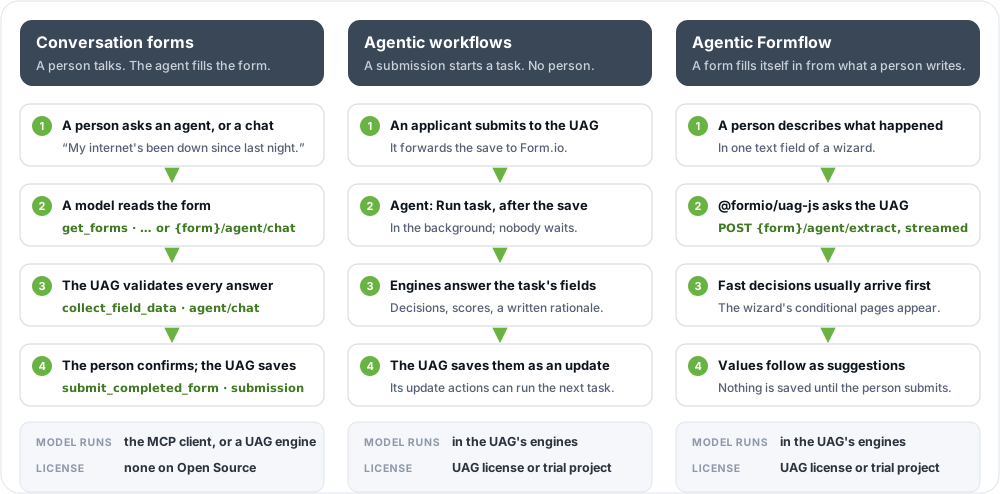
| Pattern | Who drives | Entry point | Model runs | License |
|---|---|---|---|---|
| Conversation forms | A person, through an agent or a chat on your page | /mcp, or a form's agent/chat |
In the MCP client (Claude, your own app), or in the UAG through an agent engine | None |
| Agentic workflows | A submission sent to the UAG | The "Agent: Run task" action, after the save | In the UAG, through an engine | A license that includes the UAG, or a trial project |
| Agentic Formflow | An application, or a person typing in a form | {form}/agent/extract, /decide, /generate |
In the UAG, through engines | A license that includes the UAG, or a trial project |
| AI Documents | A person uploading files to a form | An AI Document component's {form}/document/process |
In the UAG, through an agent engine | A license that includes the UAG, or a trial project |
Conversation forms over MCP
A person talks to an agent, and the agent fills in a form for them. The agent can be an existing MCP client (Claude Desktop, claude.ai, Claude Code) or a chat application you write. The model runs in the client; the UAG supplies context and performs the writes.
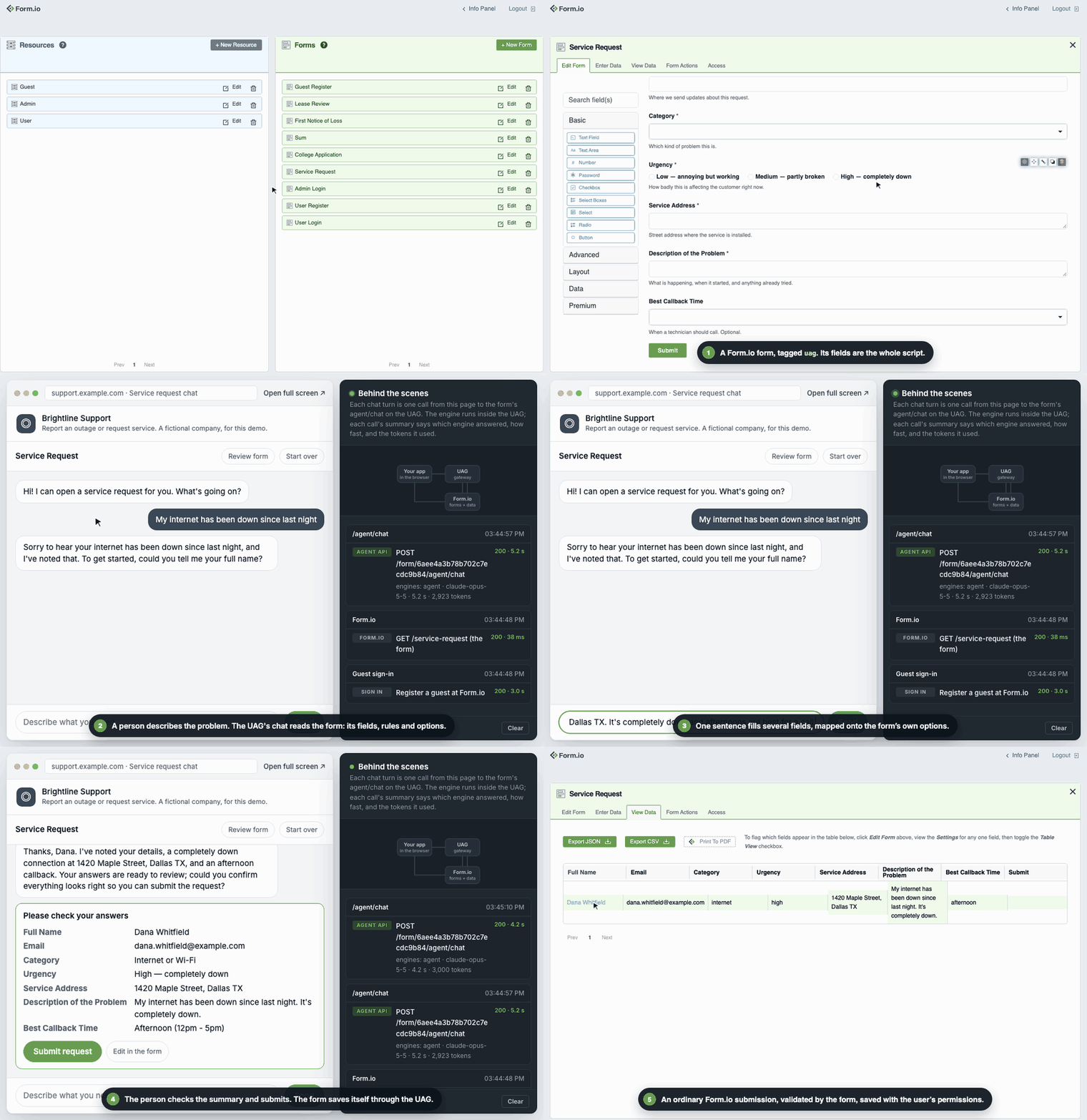
- The client authenticates: a remote client through the browser-based OAuth (PKCE) flow, a server-side client with
client_credentials. - The agent calls
get_formsto see which tagged forms the user may use, thenget_form_fieldsandget_field_infoto learn what the chosen form needs. - As the user answers, the agent calls
collect_field_data, which validates the answers against the form and reports what is still missing. Several fields can come from one sentence. confirm_form_submissionproduces a summary for the user to approve, andsubmit_completed_formcreates the submission. The UAG validates it and forwards it to Form.io, which saves it and runs the form's actions, as for a person.
The same tools let the agent find records (find_submissions) and change them (submission_update). The caller's Form.io permissions apply to every call, so an agent signed in as an employee cannot do what an employee cannot do.
Build this with MCP tools or Connect Claude.
Conversation forms in your own page
Without an MCP client, a page can offer the same conversation with the chat widget: Formio.createChat(element, formUrl) from @formio/uag-js renders one uag form as a chat. Each turn is the form's {form}/agent/chat on the UAG, which asks an agent engine and checks every value against the form; the form sits behind the chat in the browser, and is submitted through the UAG once the person confirms. No model code and no server of your own, and no license.
Agentic workflows
A submission starts an agent with no person in the loop. The application sends the submission to the UAG instead of Form.io; an "Agent: Run task" action on the form runs one of its tasks after the save, in the background, and saves the results as an update. Because that save is an ordinary update, its own Run task actions can start the next task.
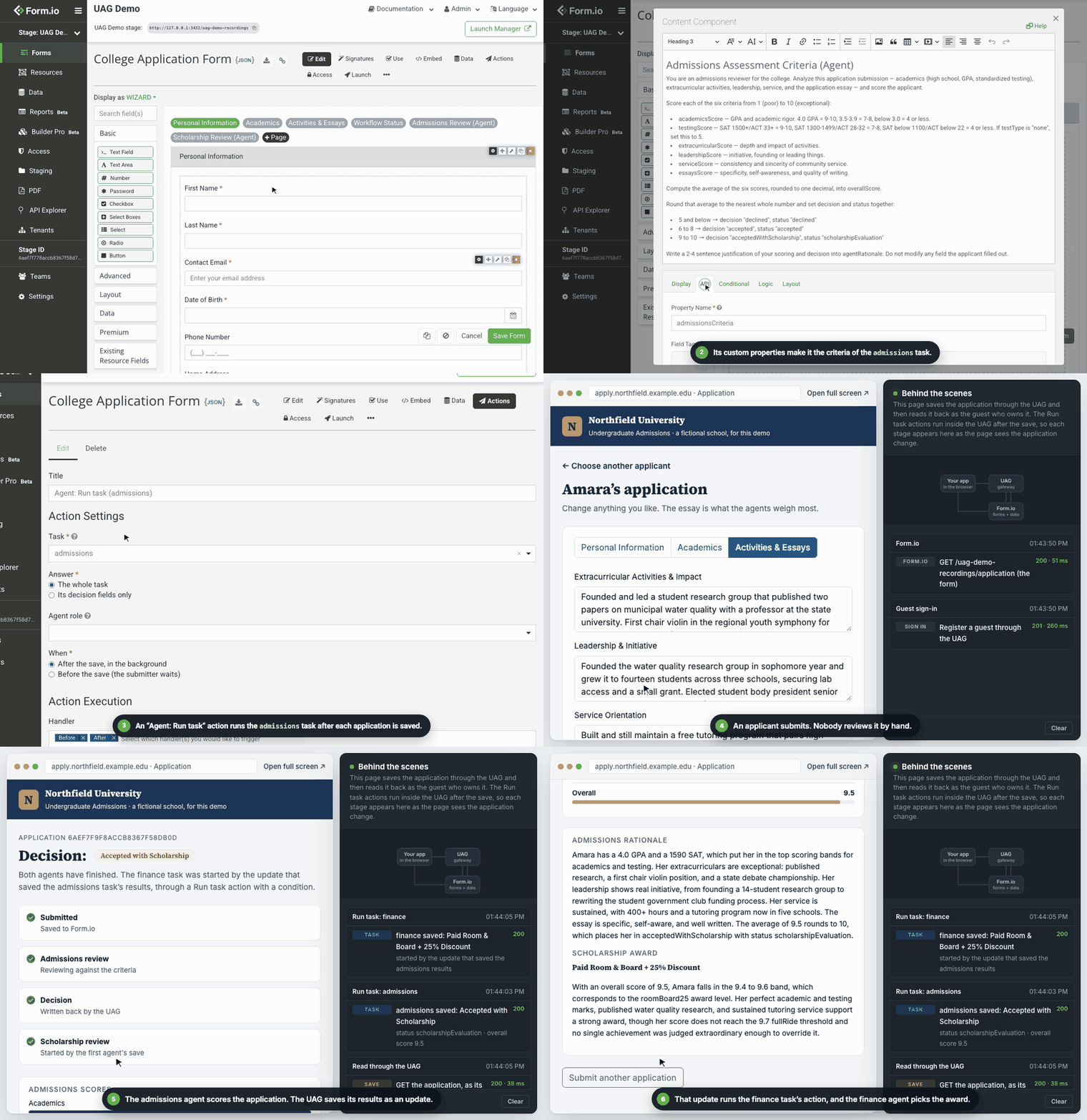
- A person (or a system) submits the form to the UAG. The UAG forwards it to Form.io, which saves it and runs its own actions, and the submitter gets Form.io's response at once.
- A Run task action, after the save, on create, takes the stored submission and plans its task: which fields are decisions, which are open values, what the engines may read.
- Decision engines answer closed-set fields with a calibrated confidence; agent engines write open values, and may first research with read-only tools the task allows.
- The UAG reconciles the answers with the stored submission, validates the result with the form, and saves only if something changed, as an update through its own pipeline. Provenance for each value goes into
metadata.uag. - That update runs the form's update actions. A second Run task action, on update, with a condition on a field the first task set, starts the next task.
No model holds a write tool at any point. A client cannot set the fields a task owns (uagAuthoritative), and on Form.io Enterprise the agent can save with a role of its own, on the user's behalf (Project setup for agents). Build this with Workflows.
Agentic Formflow
An application asks the UAG to fill a form from free text or in-flight data, and nothing is saved. The typical case is a person describing what happened while the form fills itself in: fast decisions choose which pages of a wizard apply, then extracted values prefill the rest for the person to check.
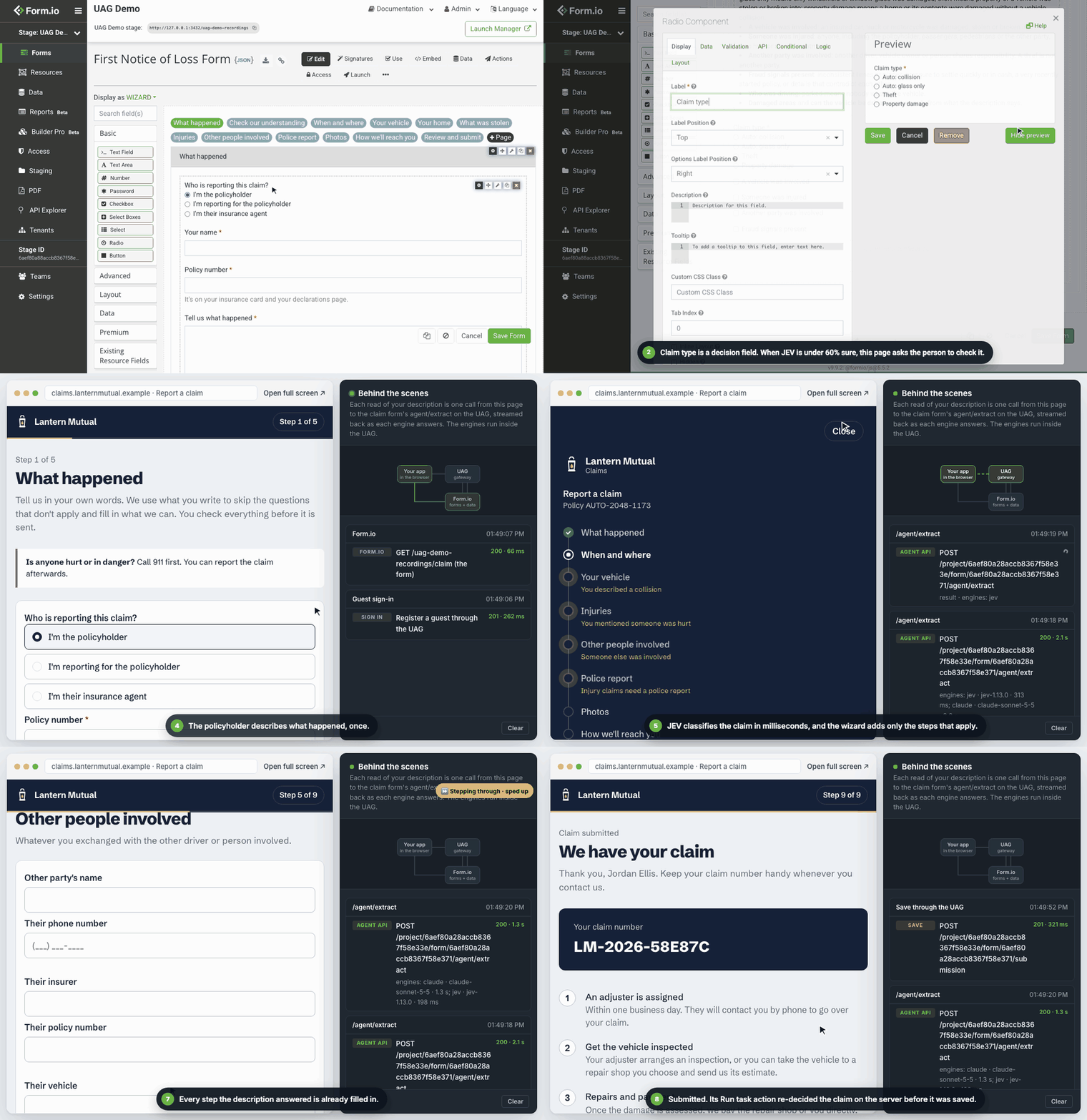
@formio/uag-js(or your code) posts the input text and the current data to the form's{form}/agent/extracton the UAG, asking for a Server-Sent Events stream, with the signed-in user's Form.io token (x-jwt-token).- The UAG runs each engine group concurrently. Decision results stream back first, in a few hundred milliseconds, so conditional pages appear before the person moves on.
- Agent-engine values follow as
suggested.@formio/uag-jsprefills them without ever overwriting what the person typed. - A
doneevent carries the merged data, validated by the form. - When the person submits to the UAG, a Run task action that runs before the save, on the decision fields only, re-decides the closed-set fields on the server, so routing never depends on values the browser sent.
{form}/agent/decide and {form}/agent/generate do the same on in-flight data, for decisions only or open values only. Build this with the Agent API and @formio/uag-js.
AI Documents
A person uploads files to a form, and the form reads them. An AI Document component (uagdocument) sends the uploaded files to the UAG, which produces what the form designer's instructions ask for: an exact extraction, a summary, an assessment or a translation. The person reviews the result before they submit, and edits it where the process allows, or in the form field it writes to.
- The form designer adds an AI Document in the form builder, picks a process (a document plugin installed on the UAG:
extract,analyze,translate, or one of your own) and writes its instructions. - The person drops one or more files. formio.js uploads them to the form's own storage, and the component posts the file references to the UAG with the signed-in user's Form.io token.
- The UAG reads the files with the user's permissions and converts each one to what the engine reads: PDF or text, with converter plugins for Word and Excel files.
- The document plugin asks an agent engine for the content and checks it.
extractcompares its copy with the file's text, retries a copy that differs, then flags it; a scan or photo has no text to compare, so its copy is flagged for the person to check. - The component shows the progress and the result. The submission keeps the file references and the result, and the person submits it as any other.
Nothing checks the result again when the submission is saved: the person's review is the control. AI Document is a module from @formio/uag-extras, added to the formio/uag image by the formio/uag-documents add-on. Build this with AI Document and Plugins.
Where the models run
The UAG never trains or hosts a model. In MCP conversations, the client's model does the reasoning. In a form's chat, workflows, Agentic Formflow and AI Documents, the UAG calls engines: adapters for a model provider, each its own npm package (jev, claude, openai, grok, gemini). The formio/uag image includes all of them, and none runs until you name it in UAG_ENGINES. Engines can also run in a separate engine server container, so model keys and model traffic stay out of the UAG.
Engines only answer. The UAG decides which fields each engine sees, validates every answer, and performs every write. See Engines and Engine server.
Map of these docs
| If you want to | Read |
|---|---|
| Run the UAG and make your first calls | Quickstart |
| Understand tasks, criteria, inputs and decision fields | Concepts |
| Look up a custom property | Form properties |
| Build an MCP client or call the tools | MCP tools |
| Call extract, decide or generate | Agent API |
| Run a task on every save with "Agent: Run task" | Workflows |
| Let an agent save with a role of its own on Form.io Enterprise | Project setup for agents |
| Connect Claude Desktop or claude.ai | Connect Claude |
| Fill forms as users type | JavaScript (formio.js) |
| Embed a form as a chat in your own page | Chat widget |
| Embed the UAG in a Node.js application | Node.js API |
| Add tools, actions, forms and templates | Modules |
| Add converters and document processes | Plugins |
| Turn uploaded files into AI-generated content people review | AI Document |
| Choose, configure and route engines | Engines |
| Write your own engine | Engine SDK |
| Keep model keys out of the UAG | Engine server |
| Measure decision accuracy before going live | Evaluation |
| Understand the trust model and harden a deployment | Security |
| Deploy and configure the UAG | Deployment |
| Have your coding agent tag forms, deploy the UAG and wire your application | Agentic Coding Plugin |
| Fix something that does not work | Troubleshooting |