
Chat widget
Embed any form tagged uag as a chat with @formio/uag-js and Formio.createChat. The conversation runs in the UAG's agent/chat, the form behind it validates and submits, and the widget is templated, translated and themed like any formio.js form.
The chat widget turns a Form.io form into a conversation. A person describes what they need in their own words; the chat asks only for what is still missing, maps their answers onto the form's own fields and options, refuses what the form would refuse, and, once they confirm a summary, submits the form. You embed it the way you embed a form:
import { Formio } from '@formio/js';
import { UAG } from '@formio/uag-js';
import '@formio/uag-js/uag-js.css';

Formio.use(UAG('https://uag.example.com'));
Formio.createChat(document.getElementById('chat'), 'https://forms.example.com/myproject/service-request');
The UAG is the only backend. There is no model code in your application, no prompt, and no server of your own: each turn is the form's own chat operation on the UAG, {form}/agent/chat, answered by one of the UAG's agent engines. The form never leaves the browser's hands. A formio.js form sits behind the chat, so the form's conditionals, calculations and validation apply as the person talks, and the submission is the form's own, saved through the UAG like any other uag form, where its Run task actions run.
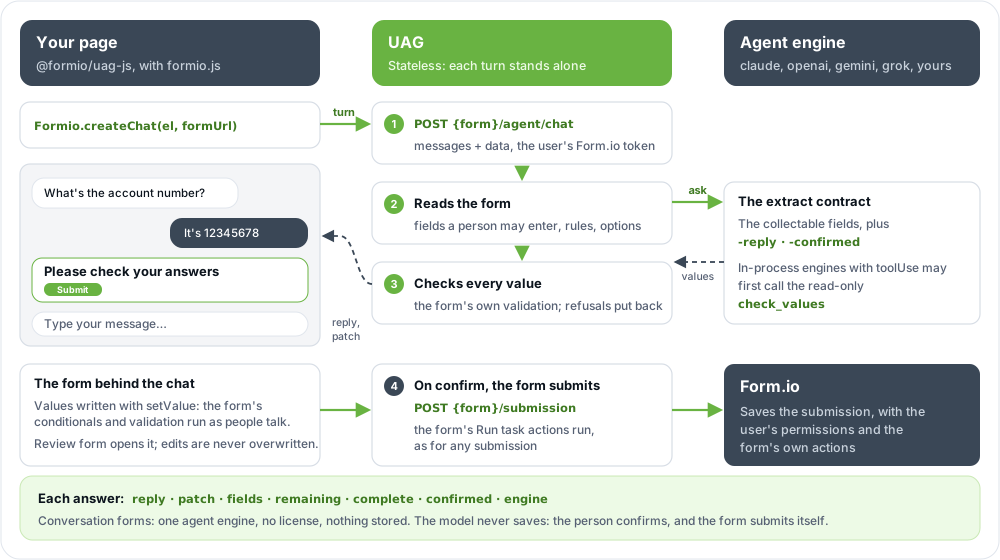
Chat is part of conversation forms: it works on Form.io Open Source with no UAG license, like the MCP tools. It needs one agent engine enabled on the UAG.
Your coding agent can do this page for you with the Agentic Coding Plugin: start from the service chat prompt.
Get it
The chat is part of @formio/uag-js 2.x (npm install @formio/uag-js), with formio.js 5 (@formio/js 5.x). Registering the module with Formio.use(UAG(...)) registers the chat display and Formio.createChat, beside the submission routing and Agent Input described in JavaScript (formio.js). uag-js.css holds the chat's default styles. The form view (Review form, Edit in form) is an ordinary formio.js form, so load your framework's CSS as for any form: Bootstrap 5 for formio.js's default templates.
With script tags:
<link rel="stylesheet" href="https://cdn.jsdelivr.net/npm/bootstrap@5.3.3/dist/css/bootstrap.min.css">
<link rel="stylesheet" href="https://cdn.jsdelivr.net/npm/@formio/js@5.6.1/dist/formio.full.min.css">
<link rel="stylesheet" href="https://cdn.jsdelivr.net/npm/@formio/uag-js@2/uag-js.css">
<script src="https://cdn.jsdelivr.net/npm/@formio/js@5.6.1/dist/formio.full.min.js"></script>
<script src="https://cdn.jsdelivr.net/npm/@formio/uag-js@2/index.js"></script>

<div id="chat"></div>
<script>
  Formio.use(FormioUAG.UAG('https://uag.example.com'));
  Formio.createChat(document.getElementById('chat'), 'https://forms.example.com/myproject/service-request')
    .then((chat) => chat.on('submitDone', (submission) => console.log('Saved', submission._id)));
</script>
Or load it from the UAG, which serves the @formio/uag-js it was installed with under /uag-js/. Load uag.use.js after formio.js: it registers itself with that UAG (the URL comes from the script's own src), with the UAG's plugin manifest and every module's component, so the page does not call Formio.use. uag-js.css holds the chat's styles and the modules' components' styles.
<link rel="stylesheet" href="https://cdn.jsdelivr.net/npm/bootstrap@5.3.3/dist/css/bootstrap.min.css">
<link rel="stylesheet" href="https://cdn.jsdelivr.net/npm/@formio/js@5.6.1/dist/formio.full.min.css">
<link rel="stylesheet" href="https://uag.example.com/uag-js/uag-js.css">
<script src="https://cdn.jsdelivr.net/npm/@formio/js@5.6.1/dist/formio.full.min.js"></script>
<script src="https://uag.example.com/uag-js/uag.use.js"></script>

<div id="chat"></div>
<script>
  Formio.createChat(document.getElementById('chat'), 'https://forms.example.com/myproject/service-request');
</script>
uag.use.js registers the module with no other options. To pass options, load index.js (from jsDelivr or npm) as above and register Formio.use(FormioUAG.UAG(url, options)) yourself, rather than registering again on top of uag.use.js; a module's components are then at {uag}/uag-js/components/<type>.js (and .css). See JavaScript (formio.js).
Allow the application's origin in the UAG's CORS setting.
Embed a chat
Formio.createChat(element, src, options) is Formio.createForm for a chat. It is also exported as createChat, and as UAG.createChat (FormioUAG.createChat with script tags).
| Argument | Meaning |
|---|---|
element |
The element to render into. |
src |
The form's Form.io URL, or its definition. A definition must carry its _id (and project on Enterprise and the hosted service), as Form.io returns it, so the chat knows the form on the UAG. |
options |
The chat's options, plus any formio.js form option: templates, i18n, language, readOnly, hooks, noAlerts, and so on. |
It resolves to the chat: a formio.js form (a Webform) rendered as a conversation, with the methods and events below on top of the form's own. The chat is a formio.js display named chat, so a definition whose display is "chat" renders as one through Formio.createForm too.
Each turn goes to the form's chat on the UAG, addressed by id like its submissions: {uag}/project/{projectId}/form/{formId}/agent/chat for a project on Enterprise or the hosted service, {uag}/form/{formId}/agent/chat on Open Source. It carries the signed-in user's Form.io token (x-jwt-token), as formio.js sends it to Form.io, so the UAG applies that user's permissions. No other token is needed.
Render from the form's URL when the chat should save: a form rendered from a definition has no URL to submit to, as with Formio.createForm.
Try it live: Chat widget.
How a conversation goes
- The chat shows a greeting (your
greeting, or one naming the form) and anysuggestions. - The person sends a message. The chat posts the conversation so far, the form's current data, and the fields the person set in the form itself (
locked) toagent/chat, shows a typing indicator, and disables Send until the turn is over (the person can keep typing). - The UAG answers with the next message (
reply, at mostagentApi.chat.maxMessageLengthcharacters) and the values it took from the conversation (patch). The chat shows the reply, and writes each value into the form's own component, so conditionals that depend on it react at once. A value the form refused is not inpatch; the reply asks again. - When the UAG reports the form
complete(every required field filled and valid), the chat shows a summary of the form's values with Submit and Edit in the form. The person can also confirm by typing ("yes, submit it"), which the UAG reports asconfirmed. - On Submit (or a confirmation), the chat calls the form's own
submit(): formio.js validates the form and sends the submission to the UAG, which runs the form's actions and saves it in Form.io. The chat then says it was submitted. If the save fails, it shows the error and the person can fix the form and submit again.
At any time, Review form shows the formio.js form behind the chat, filled in as the person talks, and Back to chat returns. A value the person changes in the form is theirs: the chat sends it as locked, so the UAG neither asks for it nor changes it, and the chat never writes over it. When a required field is one the chat cannot collect, the chat says so and opens the form, once for each set of such fields. Start over clears the conversation and the values the chat wrote; after a submission, it starts a new one with an empty form, rather than updating the one just saved. A save still in flight when the person starts over is ignored by the new conversation.
Nothing is submitted without the person's confirmation. The UAG never submits: it only answers turns.
Try it live: Validation in the chat widget.
Set up the form
Any form tagged uag can be used for chat. On the form:
| Setting | Why |
|---|---|
The uag tag |
The form is visible to the UAG. Without it, the chat says the form is not available. |
| Create access for the people who chat | A turn needs create access to the form's submissions, as the save does. |
uagAnonymous: "true" (form custom property) |
Only for visitors who do not sign in. See Public forms. |
uagChat: "false" (form custom property) |
Turns chat off for the form: its turns answer 403. |
uagChatInstructions (form custom property) |
Instructions of your own for this form's chat, added to the UAG's ("Always ask for the account number first."). |
The form's labels, descriptions, tooltips, placeholders, validation and options are what the chat works from, so write them for a person: the chat asks in their words, offers the options' labels, and explains a refusal with the form's own message.
The fields a chat collects
A turn asks for, and accepts, the form's visible input fields that a person may enter:
- Collected: text, text areas, email, phone, number, currency, checkboxes, radios, select boxes, selects with static values (or JSON), tags, date and time fields, day, URL, surveys, and the fields inside containers, fieldsets, panels, columns and tables of layout.
- Never set: fields a task fills (its decision and value fields, but not its input, which is asked like any field), fields marked
uagAuthoritative, hidden and disabled fields, fields inside a hidden panel or container, fields hidden by a conditional, fields with a calculated value (unless the calculation allows overrides), and fields that are not persisted. - Finished in the form: data grids, edit grids, data tables, dynamic wizards, tag pads, nested forms, data maps, addresses, file uploads, signatures, sketch pads, data sources, passwords, CAPTCHAs, selects whose options come from a URL or a resource, and any other component that holds rows or a nested object (a
treecomponent, or one whose data is an array of rows, a nested submission or a map). The UAG reports them inremaining.unsupported, and while a required one is empty the form cannot becomplete: the chat names them and opens the form view so the person can fill them in.
Each value is also checked for its shape before the form's own validation: a number must be a number, a checkbox true or false, select boxes and surveys only their own options and questions, and a select or radio one of its options. A value that fails is refused (invalid), and the reply asks again.
Task fields are left to the server on purpose: when the chat's submission is saved, the form's "Agent: Run task" actions decide them, as for any submission.
Options
| Option | Default | Meaning |
|---|---|---|
uagUrl |
the URL given to UAG() |
The UAG's URL for this chat. |
chatUrl |
the form's agent/chat on the UAG |
Where turns are posted instead, such as a relay of your own (see Public forms). |
title |
the form's title | The title in the chat's header. |
greeting |
"Hi! I can help you fill in {{title}}. What would you like to tell me?" | The first message. Shown, never sent to the UAG. {{title}} is the form's title; '' shows none. |
suggestions |
none | Messages the person can send with one click, shown until they send their first. |
placeholder |
"Type your message…" | The composer's placeholder. |
submitLabel |
"Submit" | The summary's submit button. |
submitted |
"Thanks! Your form was submitted." | The message after a successful save. |
markdown |
none | A function from a reply's text to HTML, such as marked.parse. Its output is always sanitized. Without it, replies are plain text. |
storage |
none | 'session' or 'local': keep the conversation and the data in the browser's storage, per form, so a reload continues it. |
maxMessages |
40 |
The most messages sent with a turn: the newest, starting at one the person wrote. Keep it within the UAG's agentApi.chat.maxMessages. |
maxMessageLength |
2000 |
The composer's character limit. Keep it within agentApi.chat.maxMessageLength. |
fetch |
the global fetch |
The fetch turns are posted with. |
Every formio.js form option applies as well. The form's own submission routing to the UAG is set by UAG(), as for any form.
Methods and events
| Member | Meaning |
|---|---|
send(text) |
Send a message, as if the person typed it. Resolves with the turn's response, or null when it failed or was dropped by a reset. |
messages |
The conversation so far, as { role: 'user' | 'assistant', content } (not the greeting, notices or summary). |
openForm(), closeForm() |
Show the form behind the chat, and return to the chat. |
submitChat() |
Submit the form, as the summary's Submit button does. |
reset() |
Start over: the conversation, the values the chat wrote, and the kept storage are cleared. A turn still in flight is ignored when it answers. |
Listen with chat.on(name, handler), as for any formio.js form:
| Event | Handler receives | When |
|---|---|---|
chatMessage |
{ role, content } |
A message is added: the person's, a reply, or the chat's own message after a successful save. |
chatReply |
the turn's response | Each turn the UAG answered: reply, patch, fields, remaining, complete, confirmed, engine. |
chatComplete |
the turn's response | The form became complete: the summary is shown. |
chatError |
the error | A turn failed (an Error, with status and response when the UAG answered), or the save failed (formio.js's error, which may be a list of errors). |
chatReset |
The person started over. | |
submitDone, submit, change, error, … |
as formio.js | The form's own events. submitDone carries the saved submission. |
const chat = await Formio.createChat(element, formUrl);
chat.on('chatReply', (turn) => {
  // Which values were taken, and which the form refused.
  console.log(turn.patch, Object.values(turn.fields).filter((field) => field.status === 'invalid'));
});
chat.on('submitDone', (submission) => window.location.assign(`/requests/${submission._id}`));Templates
The chat renders through formio.js templates, so you change its markup the way you change a form's. Each built-in template uses only uag-chat* classes, escapes everything it interpolates, and looks the same under any CSS framework.
| Template | Context (ctx) |
Renders |
|---|---|---|
uagChat |
title, view ('chat' or 'form'), labels (open, close, reset, log), log, composer, form (HTML) |
The whole widget: header, log, composer and the form. |
uagChatMessage |
role ('user' or 'assistant'), text (raw), html (safe to insert) |
One message. |
uagChatTyping |
ariaLabel |
The typing indicator. |
uagChatSuggestions |
suggestions (strings) |
The one-click messages. |
uagChatComposer |
inputId, inputLabel, placeholder, sendLabel, maxLength, inactive, busy |
The message box and send button. |
uagChatSummary |
title, rows ({ label, value }), submitLabel, editLabel, busy |
The summary shown when the form is complete. |
uagChatNotice |
kind ('info', 'error' or 'success'), text |
A notice: a failed turn, fields to finish in the form. |
formio.js's own template context is there too (ctx.t, ctx.options, …). A template is resolved from options.templates first, then the current framework's templates, then the built-in one.
What the chat needs from a template is its ref attributes. Keep the ones a replaced template held:
ref |
On | Used for |
|---|---|---|
uagChat |
the root (uagChat) |
Switching between the chat and the form view (class uag-chat--form). |
uagChatLog |
the log (uagChat) |
Messages, notices, the summary. Clicks on the refs below are handled here. |
uagChatComposer |
the composer's container (uagChat) |
Redrawing the composer. |
uagChatForm |
the form's container (uagChat) |
The form view. |
uagChatOpen, uagChatClose, uagChatReset |
buttons (uagChat) |
Review form, back to chat, start over. |
uagChatInput, uagChatSend |
the input and button (uagChatComposer) |
Sending: the button, or Enter in the input. |
uagChatSuggestion |
each suggestion (uagChatSuggestions) |
Sends its text. |
uagChatSubmit, uagChatEdit |
buttons (uagChatSummary) |
Submit, and open the form. |
Replace a template for one chat with options.templates, or for every chat with Formio.use, under the name of the framework your application renders with, which is Formio.Templates.framework, or bootstrap when that is unset, as on a default @formio/js 5 install (its Bootstrap 5 templates are registered under that name); a set registered under any other name, bootstrap5 included, is not the current framework and is ignored:
// Every chat: messages as Bootstrap cards.
Formio.use({
  templates: {
    [Formio.Templates.framework || 'bootstrap']: {
      uagChatMessage: {
        form: '<div class="card mb-2 {{ ctx.role === "user" ? "ms-auto text-bg-primary" : "" }}" style="max-width: 80%">' +
              '<div class="card-body py-2">{{ ctx.html }}</div></div>'
      }
    }
  }
});

// One chat: a notice of your own.
Formio.createChat(element, formUrl, {
  templates: {
    uagChatNotice: { form: '<div class="alert alert-{{ ctx.kind === "error" ? "danger" : "info" }}">{{ ctx.text }}</div>' }
  }
});
String templates are interpolated by formio.js: {{ }} inserts a value as is, so insert a message with ctx.html (already escaped, or sanitized markdown), never ctx.text. A template can also be a function of ctx that returns HTML, as the built-in ones are (they are exported as CHAT_TEMPLATES, to wrap or extend). Whatever a template returns, formio.js sanitizes the HTML before it is inserted.
Translations
Every fixed string goes through formio.js translation (this.t()), with its English text as the key, so i18n and language translate the chat as they translate a form:
Formio.createChat(element, formUrl, {
  language: 'es',
  i18n: {
    es: {
      'Send': 'Enviar',
      'Start over': 'Empezar de nuevo',
      'Review form': 'Revisar el formulario',
      'Back to chat': 'Volver al chat',
      'Type your message…': 'Escribe tu mensaje…',
      'Please check your answers': 'Revisa tus respuestas',
      'Submit': 'Enviar solicitud',
      'Edit in the form': 'Editar en el formulario',
      'Hi! I can help you fill in {{title}}. What would you like to tell me?': '¡Hola! Te ayudo a completar {{title}}. ¿Qué necesitas?'
    }
  }
});| String | Where |
|---|---|
Hi! I can help you fill in {{title}}. What would you like to tell me? |
The default greeting. |
Review form, Back to chat, Start over, Conversation |
The header's buttons, and the log's label. |
Message, Type your message…, Send |
The composer. |
The assistant is typing |
The typing indicator's label. |
Please check your answers, Submit, Edit in the form |
The summary. |
Thanks! Your form was submitted., The form could not be submitted. |
After a save. |
Please finish these in the form: {{fields}} |
Fields the chat cannot collect. |
This form is not available for chat. |
A form without the uag tag, or one the UAG cannot address. |
The assistant could not answer ({{status}}). Please try again., The assistant could not answer. Please try again., The chat is unavailable: fetch is not available. |
A failed turn. |
Your title, greeting, suggestions, placeholder, submitLabel and submitted are translated too. Replies are written by the model in the language the person writes in.
Styles
uag-js.css styles the chat through CSS custom properties. Set them on the chat's container, or any ancestor, to theme it without touching the rules:
| Property | Default | Used for |
|---|---|---|
--uag-chat-font |
inherit |
The font. |
--uag-chat-bg |
#f4f5f7 |
The log's background. |
--uag-chat-surface |
#ffffff |
The widget, the assistant's messages, the inputs. |
--uag-chat-text |
#0c141d |
Text. |
--uag-chat-muted |
#566073 |
Secondary text and buttons. |
--uag-chat-border |
#e0e5ec |
Borders. |
--uag-chat-accent |
#3a7d22 |
The send and submit buttons, focus, suggestions. |
--uag-chat-accent-text |
#ffffff |
Text on the accent. |
--uag-chat-user-bg, --uag-chat-user-text |
#3a4756, #ffffff |
The person's messages. |
--uag-chat-radius |
16px |
Corners. |
--uag-chat-height |
560px |
The widget's height (100% to fill its container). |
/* A dark, full-height chat. */
#chat {
  height: 100vh;
  --uag-chat-height: 100%;
  --uag-chat-bg: #0f172a;
  --uag-chat-surface: #1e293b;
  --uag-chat-text: #e2e8f0;
  --uag-chat-muted: #94a3b8;
  --uag-chat-border: #334155;
  --uag-chat-accent: #22c55e;
  --uag-chat-user-bg: #2563eb;
}
The rules use these classes, to restyle beyond the properties: uag-chat (and uag-chat--form in the form view), uag-chat__header, uag-chat__title, uag-chat__action, uag-chat__log, uag-chat__message with uag-chat__message--user or uag-chat__message--assistant, uag-chat__typing, uag-chat__suggestions, uag-chat__suggestion, uag-chat__notice with --info, --error or --success, uag-chat__summary, uag-chat__submit, uag-chat__composer, uag-chat__input, uag-chat__send, uag-chat__form and uag-chat__form-bar. Or leave uag-js.css out and style your own templates entirely.
Markdown replies
Models often answer in markdown. Give the chat a markdown function to render it; the chat sanitizes what it returns with formio.js's sanitizer (DOMPurify), so a reply can never add a script or an event handler:
import { marked } from 'marked';
Formio.createChat(element, formUrl, { markdown: (text) => marked.parse(text, { breaks: true }) });Keeping the conversation
The conversation lives in the browser: the UAG stores nothing between turns. With storage: 'session' (this tab) or storage: 'local' (this browser), the chat keeps the conversation, the data and which values it wrote under a key per form and per signed-in user (visitors who are not signed in share one key per form), and continues them when it is created again, once formio.js has attached the form. It never restores over a submission the form loaded (a form rendered from a submission's URL). A successful submission and Start over clear it. Kept data is personal data on that device: prefer 'session' on shared computers. Without storage, nothing is written to the browser's storage.
Public forms
A visitor who is not signed in has no Form.io token. Two ways to offer them a chat:
- Anonymous use. Set
uagAnonymous: "true"on the form, and let the Anonymous role create its submissions. The UAG then answers visitors directly, rate-limited per address and in total, together with the form's other anonymous agent operations (AGENT_ANONYMOUS_RATE_LIMIT, default 10 a minute per address, andAGENT_ANONYMOUS_TOTAL_RATE_LIMIT, default 100). Every anonymous turn spends your model budget: set the limits for what you are prepared to pay, and a spend limit at your model provider. - A relay of your own, when you need more: a CAPTCHA, a daily budget, your own sessions. The relay checks what it must, then calls the UAG with a key the browser never sees. Either point only the turns at it with
chatUrl, or register the relay's base URL as the UAG's URL (Formio.use(UAG(relayUrl))) and have it serve the UAG's paths for your form: the form ({relay}/{formPath}), its turns ({relay}[/project/{id}]/form/{id}/agent/chat) and its save ({relay}[/project/{id}]/form/{id}/submission). A public page can also go without a relay: sign each visitor in as a user of your project, a guest user for example, and call the UAG with that user's token, under per-user rate limits (agentApi.rateLimits.caller).
The UAG refuses project and admin keys on browser requests, so a key cannot be used from a page; see Security.
Limits and licensing
- No Agentic Formflow license. Chat is part of conversation forms, like the MCP tools: it runs on Form.io Open Source and on a trial project with an unlicensed UAG. A self-hosted Enterprise project needs a license that includes the UAG to be served at all, and nothing more for chat (see Editions).
GET /agent/capabilitiesreportsoperations.chat. The rest of the Agent API (extract,decide,generate), Agent Input and Run task are Agentic Formflow, and need a license or a trial project. - Engines. A turn needs an agent engine. The UAG tries the engines in
agentApi.chat.engines(default: every agent engine) in order, each within its timeout, and moves to the next on a failure. See Engines. - Bounds. A turn carries at most 40 messages of at most 2000 characters each, and the UAG sends the engine the newest 24,000 characters of the conversation (
agentApi.chat). Callers are rate-limited per operation withagentApi.rateLimits.caller.chat. See Agent API.
Troubleshooting
| Symptom | Cause and fix |
|---|---|
| "This form is not available for chat." | The form is not tagged uag, or its definition has no _id (render it from its URL, or keep the _id Form.io returned). |
| 404 "The form "…" does not exist or is not tagged "uag"." | The UAG has not seen the form as tagged yet: it re-reads the project every PROJECT_TTL seconds. Wait, or restart the UAG, after tagging a form. |
| Every turn fails with 503 "No enabled engine can serve chat." | Enable an agent engine on the UAG (UAG_ENGINES). A decision engine alone cannot chat. |
| 401 "Sign in to use this form's agent operations and routes." | The visitor is not signed in and the form does not allow anonymous use. Sign them in, or set uagAnonymous. |
| 403 on every turn | The user cannot create the form's submissions, or the form sets uagChat: "false". |
429 with Retry-After |
A caller, anonymous or engine rate limit. The chat shows the UAG's message; the person can try again. |
| The chat never offers to submit | A required field is one the chat cannot collect: the chat names it and opens the form. Or a value fails the form's validation: the reply says which. |
| Turns fail with 400 after a long conversation | The conversation is over the UAG's agentApi.chat.maxMessages or maxMessageLength. The chat sends at most maxMessages (default 40) of the newest messages; keep that option, and the composer's maxMessageLength, within the UAG's settings. |
| A value the person typed in the form is not changed by the chat | By design: the chat never writes over the person's own values. |
| Turns fail in the browser with a CORS error | Allow the application's origin in the UAG's CORS setting. |