
Examples / Fill in forms
Fill an online form from a scanned paper form
A person uploads a scan of a paper form they filled in by hand, and the online version of the form fills itself in from it.
Paper forms do not go away: people print them, fill them in by hand, and send a scan or a photo. This example reads that scan into the online version of the same form, in two steps, each of which the person can see and correct:
- An AI Document field reads the scan. It sends the upload to an AI model that can read images, with instructions the form designer wrote in its
instructionssetting: copy each handwritten field asSection, Label: value. That transcript goes into the form's What the scan says field, the AI Document'starget. - Agent Input, part of the UAG's browser library
@formio/uag-js, fills the form's fields from the transcript, as in Fill a form from a description. What the scan says is the field it reads (uagField: "input"), and every field it should fill carries the same task name inuag(herefill).
You can upload a PNG, a JPEG or a scanned PDF; the UAG turns images into a PDF before the AI reads them. Nothing is saved until the person checks the form and submits it, and the form's own validation applies to every value. If a line of the transcript is wrong, the person can correct it and click outside the box: the fields they have not changed themselves update to match.
A few lines of page code wait for the AI Document's result, then ask Agent Input to read it. Open the blank paper form to see the original, and the sample scan to see a filled-in copy as a scanner captured it.
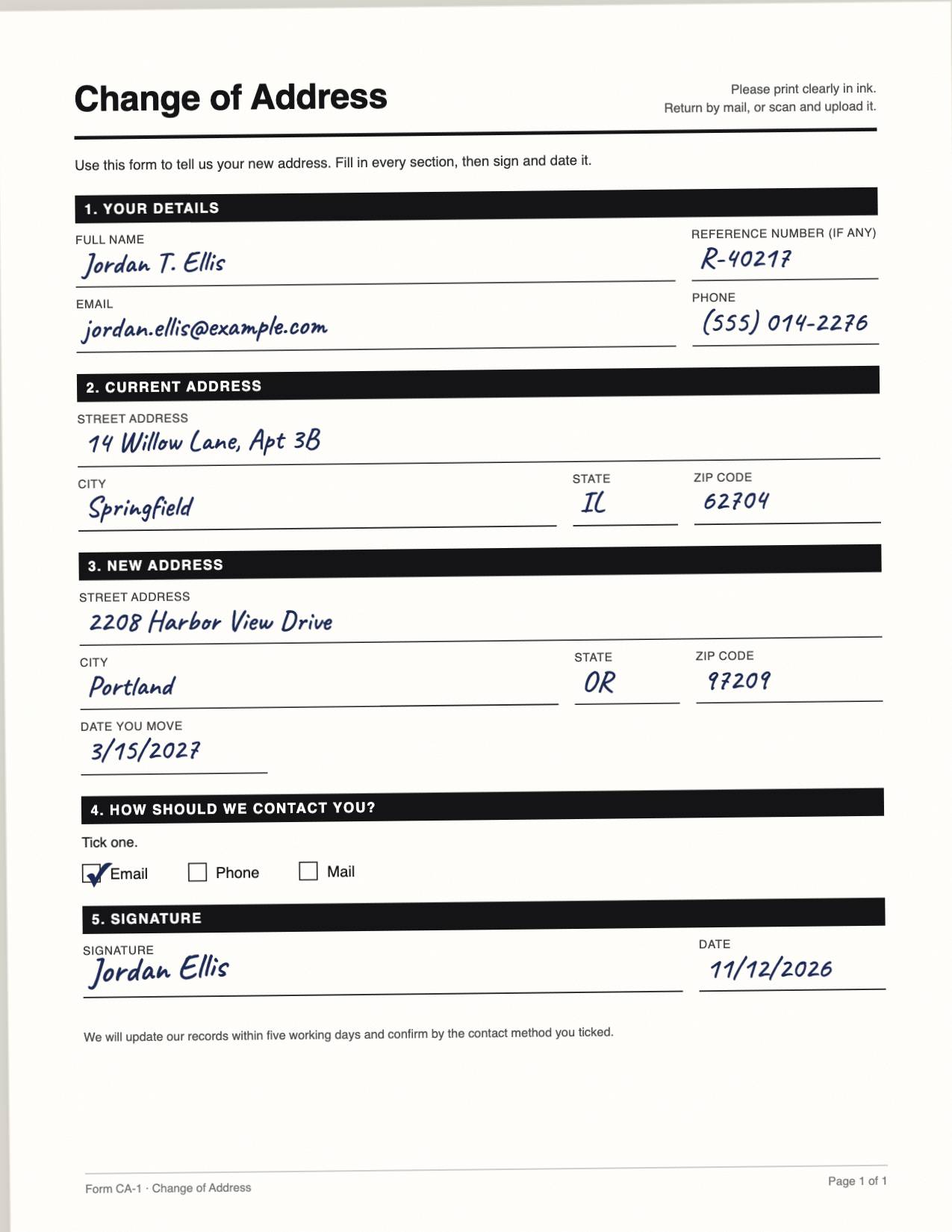
Try it: click Use the sample scan, or upload your own scan of the blank form (up to 3 MB), and watch the transcript appear and then the form fill in.
To run this on your own UAG, you need the AI Document add-on (formio/uag-documents) and an AI model that can read images, such as Claude.
Turn it on
{
  "title": "Example: Fill an online form from a scanned paper form",
  "name": "exampleFillFromScannedForm",
  "path": "example-fill-from-scanned-form",
  "type": "form",
  "display": "form",
  "tags": [
    "uag"
  ],
  "properties": {
    "description": "A change of address: the person's details, their current and new address, and how to contact them, filled in from a scan of the paper form."
  },
  "components": [
    {
      "type": "uagdocument",
      "key": "scan",
      "label": "Upload the scanned paper form",
      "input": true,
      "tree": true,
      "tableView": false,
      "description": "A scan or photo of the filled-in paper form: PDF, PNG or JPEG, up to 3 MB.",
      "uag": {
        "plugin": "analyze",
        "settings": {},
        "instructions": "This is a scan of a Change of Address form, filled in by hand. Transcribe what the person wrote in every field, one line per field, as \"Section, Label: value\" with the form's own printed section names and labels (for example \"New address, City: Portland\"). Copy the handwriting exactly as written; do not correct, complete or reformat it. Write (blank) for an empty field and (unclear) for writing you cannot read. For the contact section, name the box that is ticked. Write nothing else: no heading, no summary.",
        "instructionsComponent": "",
        "accept": [],
        "converters": {},
        "engine": "",
        "auto": true,
        "target": "transcript"
      },
      "components": [
        {
          "type": "file",
          "key": "files",
          "label": "Scanned form",
          "input": true,
          "storage": "base64",
          "multiple": false,
          "hideLabel": true,
          "filePattern": ".pdf,.png,.jpg,.jpeg",
          "fileMaxSize": "3MB",
          "tableView": false
        },
        {
          "type": "hidden",
          "key": "result",
          "input": true
        }
      ]
    },
    {
      "type": "textarea",
      "key": "transcript",
      "label": "What the scan says",
      "input": true,
      "rows": 8,
      "description": "Read from the scan by the AI. Check it against the paper and correct it if needed: the fields below are filled in from it.",
      "properties": {
        "uag": "fill",
        "uagField": "input"
      }
    },
    {
      "type": "panel",
      "key": "yourDetails",
      "title": "Your details",
      "input": false,
      "properties": {
        "uag": "fill"
      },
      "components": [
        {
          "type": "columns",
          "key": "columnsFullName",
          "input": false,
          "columns": [
            {
              "components": [
                {
                  "type": "textfield",
                  "key": "fullName",
                  "label": "Full name",
                  "input": true,
                  "validate": {
                    "required": true
                  }
                }
              ],
              "width": 8,
              "size": "md"
            },
            {
              "components": [
                {
                  "type": "textfield",
                  "key": "reference",
                  "label": "Reference number",
                  "input": true
                }
              ],
              "width": 4,
              "size": "md"
            }
          ]
        },
        {
          "type": "columns",
          "key": "columnsEmail",
          "input": false,
          "columns": [
            {
              "components": [
                {
                  "type": "email",
                  "key": "email",
                  "label": "Email",
                  "input": true,
                  "validate": {
                    "required": true
                  }
                }
              ],
              "width": 8,
              "size": "md"
            },
            {
              "components": [
                {
                  "type": "phoneNumber",
                  "key": "phone",
                  "label": "Phone",
                  "input": true
                }
              ],
              "width": 4,
              "size": "md"
            }
          ]
        }
      ]
    },
    {
      "type": "panel",
      "key": "currentAddress",
      "title": "Current address",
      "input": false,
      "properties": {
        "uag": "fill"
      },
      "components": [
        {
          "type": "textfield",
          "key": "currentStreet",
          "label": "Street address",
          "input": true,
          "validate": {
            "required": true
          }
        },
        {
          "type": "columns",
          "key": "columnsCurrentCity",
          "input": false,
          "columns": [
            {
              "components": [
                {
                  "type": "textfield",
                  "key": "currentCity",
                  "label": "City",
                  "input": true,
                  "validate": {
                    "required": true
                  }
                }
              ],
              "width": 6,
              "size": "md"
            },
            {
              "components": [
                {
                  "type": "textfield",
                  "key": "currentState",
                  "label": "State",
                  "input": true
                }
              ],
              "width": 2,
              "size": "md"
            },
            {
              "components": [
                {
                  "type": "textfield",
                  "key": "currentZip",
                  "label": "ZIP code",
                  "input": true
                }
              ],
              "width": 4,
              "size": "md"
            }
          ]
        }
      ]
    },
    {
      "type": "panel",
      "key": "newAddress",
      "title": "New address",
      "input": false,
      "properties": {
        "uag": "fill"
      },
      "components": [
        {
          "type": "textfield",
          "key": "newStreet",
          "label": "Street address",
          "input": true,
          "validate": {
            "required": true
          }
        },
        {
          "type": "columns",
          "key": "columnsNewCity",
          "input": false,
          "columns": [
            {
              "components": [
                {
                  "type": "textfield",
                  "key": "newCity",
                  "label": "City",
                  "input": true,
                  "validate": {
                    "required": true
                  }
                }
              ],
              "width": 6,
              "size": "md"
            },
            {
              "components": [
                {
                  "type": "textfield",
                  "key": "newState",
                  "label": "State",
                  "input": true
                }
              ],
              "width": 2,
              "size": "md"
            },
            {
              "components": [
                {
                  "type": "textfield",
                  "key": "newZip",
                  "label": "ZIP code",
                  "input": true
                }
              ],
              "width": 4,
              "size": "md"
            }
          ]
        },
        {
          "type": "day",
          "key": "moveDate",
          "label": "Date you move",
          "input": true
        }
      ]
    },
    {
      "type": "radio",
      "key": "contactBy",
      "label": "How should we contact you?",
      "input": true,
      "values": [
        {
          "label": "Email",
          "value": "email"
        },
        {
          "label": "Phone",
          "value": "phone"
        },
        {
          "label": "Mail",
          "value": "mail"
        }
      ],
      "properties": {
        "uag": "fill"
      }
    },
    {
      "type": "day",
      "key": "signedOn",
      "label": "Date signed",
      "input": true,
      "properties": {
        "uag": "fill"
      }
    },
    {
      "type": "button",
      "key": "submit",
      "label": "Submit",
      "action": "submit",
      "input": true
    }
  ]
}<link rel="stylesheet" href="https://ai.form.io/uag-js/uag-js.css">
<script src="https://cdn.jsdelivr.net/npm/@formio/js@5.6.1/dist/formio.full.min.js"></script>
<!-- Registers @formio/uag-js with this UAG: forms tagged uag save through it, and get Agent Input and the chat. -->
<script src="https://ai.form.io/uag-js/uag.use.js"></script>
<div id="form"></div>
<script>
Formio.createForm(document.getElementById('form'), 'https://uag.form.io/example-fill-from-scanned-form').then((form) => {
// When the AI Document has read the scan into "transcript" (its target field),
// Agent Input fills the rest of the form from that text.
const agent = FormioUAG.UAG.attach(form, {});
form.on('uagDocumentResult', (event) => {
if (event.path === 'scan' && form.submission.data.transcript) agent.extract();
});
});
</script>Try it
Start the live examples
The examples call real models. Starting them signs you in as a temporary guest of the examples' project, for every example; what you enter is deleted after a day.
Not supported without a license
This demo needs a license (LICENSE_KEY) that includes the UAG, or a 30-day free trial project on portal.form.io. This deployment has neither: it serves an Open Source project, or its UAG is unlicensed.
The chat widget examples work everywhere, with no license.